
Introduction
────────────────────────
iPhone storage increased after iOS update describes a situation where total storage usage rises immediately after installing a new iOS version, even though no new apps, photos, or videos were added.
The increase appears right after the update finishes.
User content remains the same.
No large downloads were performed.
This pattern does not automatically indicate corruption or duplication.
During an update, iOS rebuilds internal indexes, verifies file integrity, regenerates caches, and reallocates reserved system blocks.
These operations temporarily expand allocation tables and working storage segments.
The visible rise reflects structural processing inside the system layer rather than growth caused by user activity.
The key distinction is whether the increase belongs to a temporary reindex window or to a persistent storage expansion state.
That boundary makes it clear whether the storage settles naturally or needs closer attention.
This article defines that boundary and explains where user control ends.
────────────────────────
Step-by-Step Guide
────────────────────────
────────────────────────
Step 1: Confirm the Timing of the Increase
────────────────────────
Identify when the iPhone storage increased after iOS update first became visible.
If the change occurred immediately after installing the iOS update, the update cycle is the primary trigger.
Open Settings → General → iPhone Storage.
Compare the current total with the amount remembered before the update.
A sudden rise within the first 24–72 hours typically aligns with background restructuring.
An increase that begins days later may belong to a different cause.
The moment the increase appeared already narrows the likely cause.
────────────────────────
Step 2: Locate the Category of Growth
────────────────────────
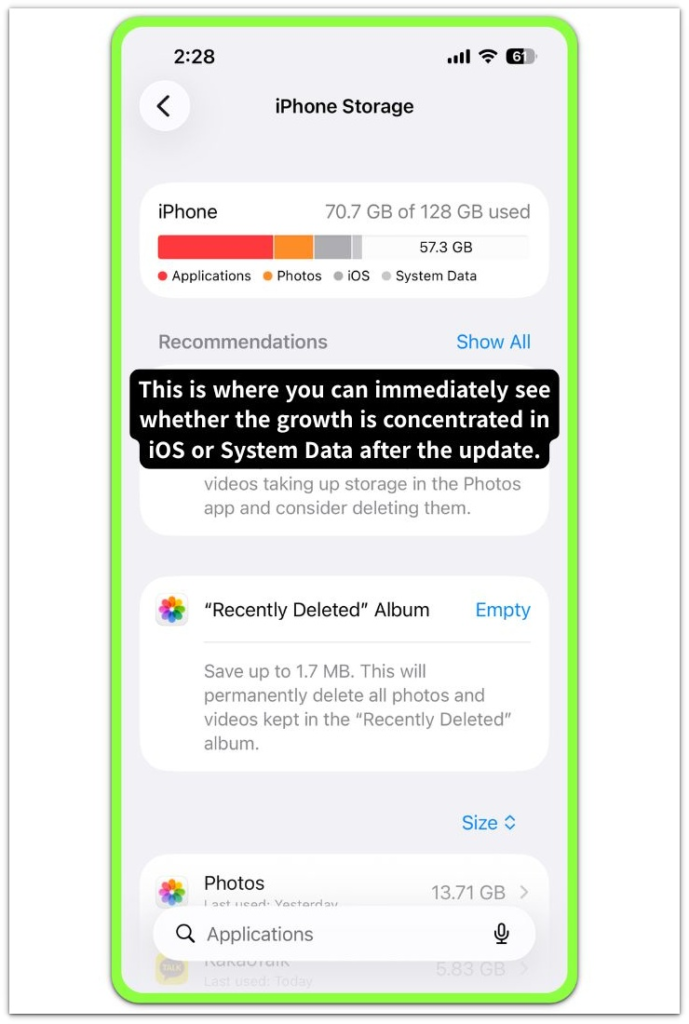
Review which category expanded.
If the rise appears under “System Data” or “iOS,” the increase likely originates from internal reorganization.
If Photos, Apps, or Messages show growth, user-level content must be examined instead.
Update-related expansion concentrates in system-managed segments rather than personal libraries.
Separating categories keeps system activity distinct from user content growth.
────────────────────────
Step 3: Observe Stabilization Under Idle Conditions
────────────────────────
Connect the device to power and Wi-Fi.
Leave it idle for several hours.
Background reindexing and validation tasks complete more consistently under stable network and charging conditions.
Avoid deleting large volumes of data during this period.
Interrupting allocation cycles can prolong temporary expansion.
If the iPhone storage increased after iOS update begins to stabilize or slightly decline within a few days, the condition belongs to a transitional processing stage.
────────────────────────
Step 4: Detect Persistent Expansion Patterns
────────────────────────
Monitor whether storage continues increasing without additional updates or downloads.
A stable plateau indicates processing completion.
Continuous upward movement suggests structural expansion beyond the reindex window.
Once the stabilization window passes, the pattern no longer matches a temporary system reindex period.
The behavior moves beyond short-term indexing and reflects a different storage pattern.
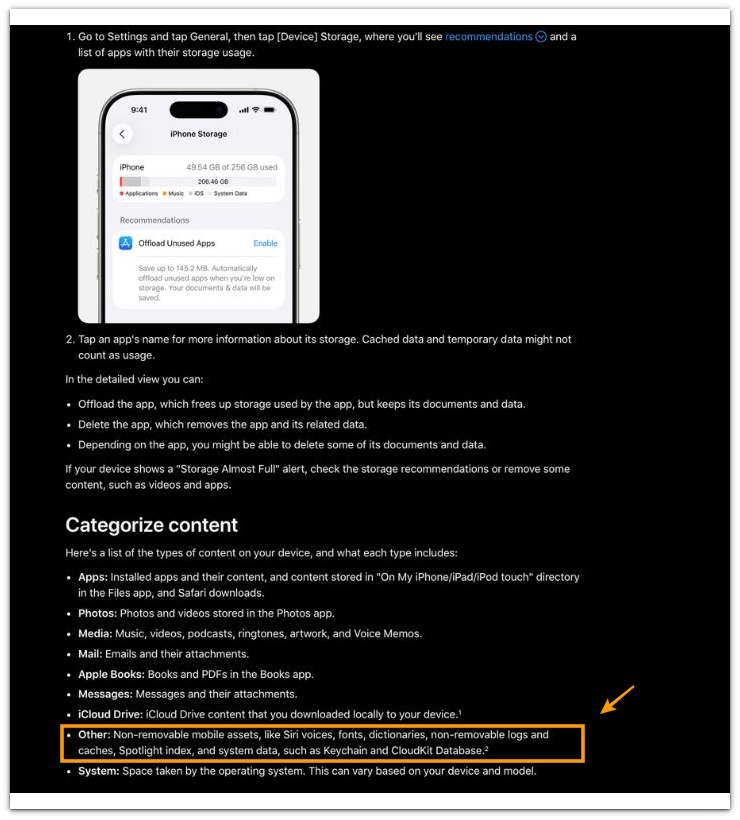
For a detailed explanation of how iOS manages system storage and system data, refer to Apple’s official support documentation below.
────────────────────────
Troubleshooting: iphone storage increased after ios update
────────────────────────
────────────────────────
Troubleshooting 1: Storage remains elevated several days after the iOS update
────────────────────────
Storage does not decrease even after several days.
If the increase remains unchanged beyond a reasonable stabilization window, the situation likely moved past temporary reindex processing.
A true reindex period shows movement.
It either stabilizes or slightly adjusts downward.
If no measurable change occurs after multiple idle charging cycles, the allocation growth may no longer be transitional.
Without this separation, a persistent expansion can easily be mistaken for normal update behavior.
────────────────────────
Troubleshooting 2: System Data continues rising beyond the expected stabilization window
────────────────────────
System Data continues expanding daily in an iPhone storage increased after iOS update scenario.
Short-term fluctuation is expected after an update.
Daily upward growth without additional usage is not.
When System Data increases incrementally over several days, the update-triggered processing window has likely closed.
When the increase continues beyond the expected window, it reflects retained logs, rebuild residue, or deeper structural allocation retention.
Temporary update expansion stops moving.
Persistent growth keeps climbing.
Watching the trend over several days reveals whether the increase is transitional or persistent.
────────────────────────
Troubleshooting 3: Storage increases without visible performance impact
────────────────────────
Device performance remains normal while storage increases.
Temporary reindex processing often occurs without visible lag.
The device feels stable.
If performance remains steady and battery behavior does not shift, the increase may still belong to controlled background activity.
However, if storage growth combines with abnormal heat, lag, or indexing loops, the issue may extend beyond update restructuring.
Storage increase alone is not enough to define severity.
The surrounding device behavior helps clarify how serious the increase really is.
If the pattern continues beyond normal update behavior, further structured review may be required.
────────────────────────
Additional Tips
────────────────────────
Avoid force restarting repeatedly during the first stabilization period.
Repeated interruption can reset background optimization tasks, prolonging temporary allocation expansion.
Keep sufficient free space available during the update window.
Extremely low free storage increases the chance of retained system segments.
Do not immediately erase apps or media in response to the first spike.
Premature deletion can obscure whether the rise was transitional.
In an iPhone storage increased after iOS update case, waiting through the first update cycle usually provides a clearer picture than reacting immediately.
────────────────────────
Final Notes
────────────────────────
An increase in storage immediately after an iOS update is not automatically a fault.
In an iPhone storage increased after iOS update situation, what matters is whether the increase settles or keeps moving upward over time.
If storage stabilizes after several idle charging sessions, the rise belonged to a temporary reindex period.
If it continues expanding without new usage, the condition shifts into structural retention or allocation growth.
What defines the boundary is not the first spike, but whether the number settles or keeps moving over time.
────────────────────────
Checklist
────────────────────────
☐ Confirm storage increase occurred immediately after the iOS update
☐ Verify growth is concentrated under System Data or iOS
☐ Allow 24–72 hours of idle charging and Wi-Fi stabilization
☐ Monitor whether storage stabilizes or continues rising
☐ Distinguish temporary processing from persistent expansion
If the number levels off, the update process likely finished. If it keeps climbing, you are no longer looking at a temporary update effect.
────────────────────────
Extra Section 1
────────────────────────
In several update cycles, the storage spike appeared within minutes after the installation completed.
In one case, the device showed nearly 3GB of additional usage immediately after rebooting from the update. No new apps were installed. No media was added.
The number remained unchanged for a few hours. After leaving the device connected to Wi-Fi and power overnight, the storage reading dropped by roughly 1.5GB without any manual deletion.
This pattern repeated across different update versions. The spike came first. Stabilization followed after idle background processing.
The key observation was not the size of the spike, but whether the number moved after extended idle time.
When movement occurred, the condition behaved like routine reindex activity rather than permanent storage expansion.
────────────────────────
Extra Section 2
────────────────────────
There were also cases where the increase did not decline.
In one observed instance, System Data continued growing by small increments each day, even after multiple overnight charging sessions. The number did not stabilize.
The device showed no visible lag. Battery behavior remained normal. Yet the storage reading kept climbing slowly.
That pattern differed clearly from the temporary spikes seen after normal updates.
Temporary update growth shifted within one to three days. Persistent expansion showed steady upward movement without reversal.
Watching the storage trend for several days in an iPhone storage increased after iOS update case made the difference visible without guessing.