
Introduction
────────────────────────
iPhone Storage Bar Wrong refers to a condition where the storage graph appears inaccurate compared to the device’s actual usable allocation.
The colored bar looks full.
Numbers seem inconsistent.
Yet app installs may still proceed, or space calculations do not match the visual segments.
This is not a cosmetic glitch.
It reflects a separation between visualization logic and actual storage allocation control inside iOS.
The storage bar represents categorized estimates generated from metadata grouping.
Actual allocation operates at block-level management inside the file system layer.
When grouping refresh cycles lag behind allocation updates, the bar can display proportions that no longer reflect current block distribution.
The mismatch forms at the reporting layer.
User actions operate above that boundary.
This article defines where that boundary exists and clarifies when the discrepancy stops being user-correctable.
────────────────────────
Step-by-Step Guide
────────────────────────
────────────────────────
Step 1: Confirm Visual Mismatch
────────────────────────
Open Settings → General → iPhone Storage.
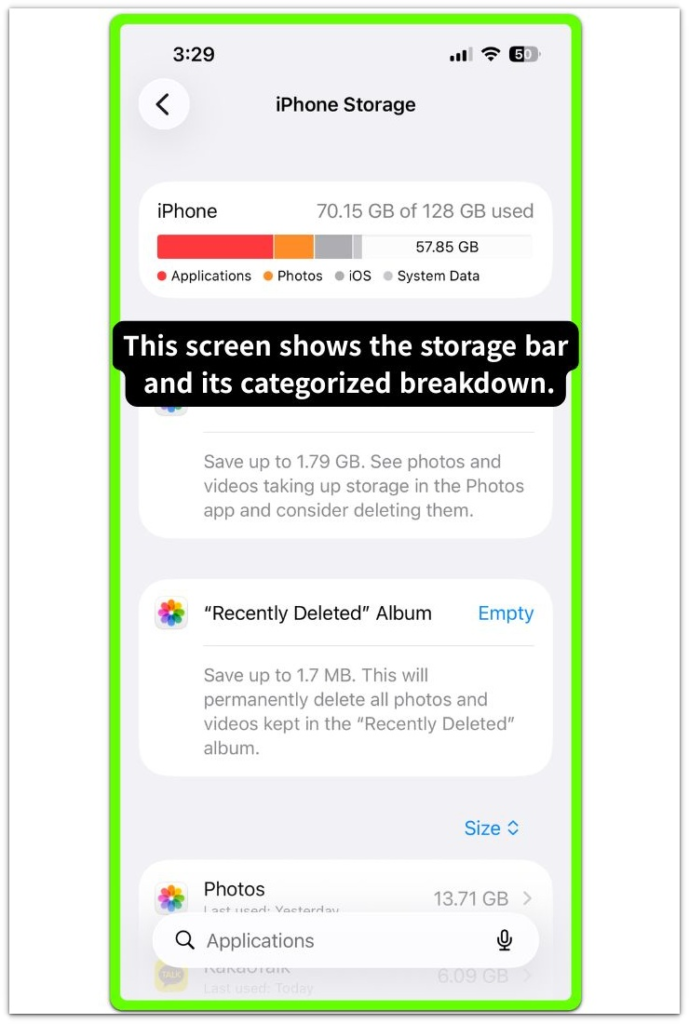
Observe whether the colored category bar appears saturated while numerical free space remains present.
If the bar and numeric total contradict each other, the issue is visual grouping, not immediate allocation exhaustion.
This step determines whether iphone storage bar wrong reflects allocation enforcement or only a display-layer mismatch.
────────────────────────
Step 2: Trigger a Category Recalculation
────────────────────────
Restart the device.
Return to the storage screen after full boot.
If category proportions shift while total capacity remains stable, the previous state was a delayed visualization refresh.
If proportions remain fixed yet usable space changes, iphone storage bar wrong is being driven by allocation updates that preceded metadata regrouping.
────────────────────────
Step 3: Distinguish System Data From Visualization Lag
────────────────────────
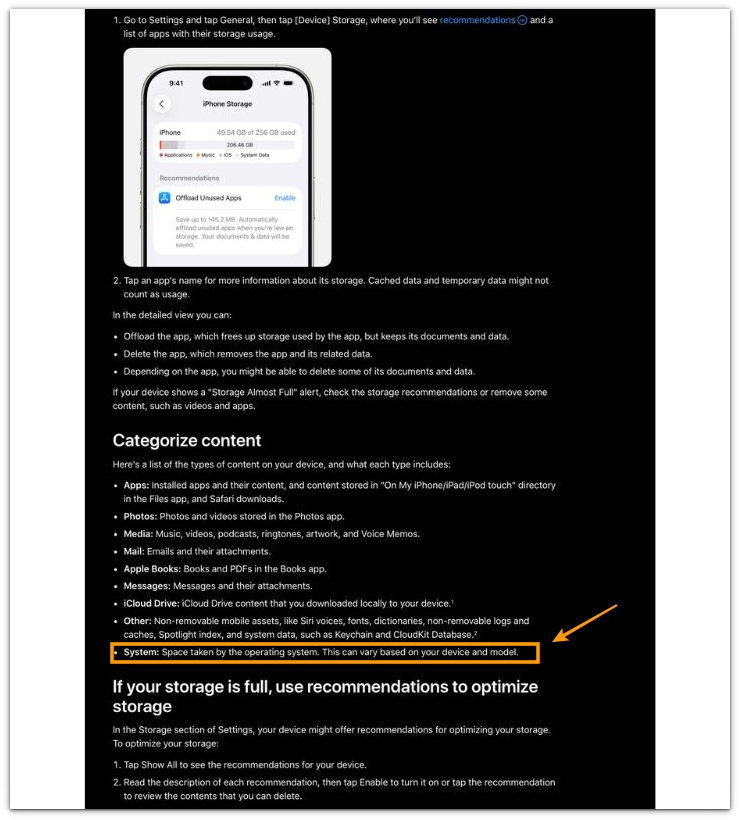
If “System Data” or “Other” expands visually without active downloads, it may reflect temporary indexing, log consolidation, or cache restructuring.
When the numeric available space remains usable despite category growth, the bar reflects grouping expansion rather than storage lockout.
User deletion cannot directly control that grouping phase once allocation management operates independently.
For detailed guidance on how iOS manages storage categories and system data, refer to the official Apple support documentation below.
────────────────────────
Troubleshooting: iphone storage bar wrong
────────────────────────
────────────────────────
Troubleshooting 1: Installation Fails Despite Visible Free Space
────────────────────────
If app installation or updates are refused while numeric free space still appears available, the issue extends beyond visualization.
This behavior signals allocation enforcement at block level.
iOS maintains protected system reserves that are not fully represented inside the storage graph.
When operational reserve thresholds are reached, write operations are restricted regardless of how the colored bar appears.
Deleting minor user files rarely changes the outcome in this condition.
The limitation exists inside allocation control, not inside the visual grouping layer.
The bar may appear misleading, but the actual constraint forms below the reporting structure.
────────────────────────
Troubleshooting 2: Storage Bar Appears Full but Device Functions Normally
────────────────────────
If the storage bar looks saturated yet app installs, downloads, and recordings proceed without restriction, the condition remains within visualization delay.
Category segments are built from metadata grouping cycles.
Those cycles do not always synchronize instantly with block release or cache consolidation.
Following system updates or indexing phases, category sizes may temporarily expand before reconciliation stabilizes.
In this scenario, deletion is unnecessary.
The mismatch reflects grouping latency rather than structural exhaustion.
Allocation enforcement has not activated, which means iphone storage bar wrong remains within user-observable reporting delay.
────────────────────────
Troubleshooting 3: Category Proportions Remain Frozen Across Restarts
────────────────────────
If the storage bar proportions remain unchanged across multiple restarts while numeric totals fluctuate inconsistently, the discrepancy likely involves reporting-layer metadata inconsistency.
The visualization layer is no longer recalculating accurately.
User-level cleanup actions cannot directly realign metadata grouping once this separation forms.
Deleting photos or removing apps does not repair reporting alignment when indexing logic fails to resynchronize.
The limitation now sits inside system-managed tracking behavior.
User influence becomes limited because reporting and allocation layers are no longer aligned.
If the discrepancy persists after these checks, the issue has likely moved beyond user-level correction.
────────────────────────
Additional Tips
────────────────────────
In iphone storage bar wrong cases, the storage bar summarizes categorized estimates rather than raw allocation segments.
It does not expose raw allocation segments, protected reserves, or transactional buffers.
Large deletions may reduce numeric capacity before visual categories shrink.
This sequence reflects block release preceding metadata reconciliation.
Operational behavior remains the reliable indicator.
If recording, installation, and update processes continue normally, allocation remains functional.
Visual imbalance alone does not confirm structural exhaustion.
Interpret behavior before reacting to color proportions.
────────────────────────
Final Notes
────────────────────────
iPhone Storage Bar Wrong remains a visualization boundary issue until allocation enforcement activates.
The decisive factor is operational restriction.
If write operations are blocked, the limitation resides inside allocation control.
If operations continue normally, the discrepancy remains inside reporting logic.
User influence ends where allocation protection begins.
Misreading that boundary often leads users to delete content that was never the real constraint.
────────────────────────
Checklist
────────────────────────
☐ Confirm whether installation or updates are actually blocked
☐ Compare numeric free space against visual bar saturation
☐ Restart once to observe recalculation behavior
☐ Monitor whether category sizes adjust after indexing completes
☐ Stop deletion attempts if write operations remain restricted
What actually happens on the device matters more than what the storage bar suggests.
────────────────────────
Extra Section 1
────────────────────────
This condition commonly appears after major iOS updates or device restoration.
Users observe a heavily saturated storage bar and assume hidden files are consuming space.
Allocation and categorization do not complete simultaneously.
Indexing processes rebuild metadata groupings separately from block reassignment.
Temporary cache expansion during indexing can exaggerate certain visual segments.
In practical scenarios, panic-driven deletion removes valuable content without resolving the underlying discrepancy.
The critical evaluation method is functional testing.
If the device continues installing apps and recording media, the allocation layer remains intact.
If those operations fail, the constraint sits below the visualization structure.
That distinction determines whether intervention is necessary.
────────────────────────
Extra Section 2
────────────────────────
The storage bar is designed for simplified interpretation.
iOS conceals raw allocation maps, protected buffers, and write reserves to maintain system stability.
Visualization prioritizes clarity.
Allocation prioritizes integrity.
Temporary divergence between those layers creates confusion.
In real situations, users often delete large photo libraries expecting the bar to shrink immediately, only to see almost no visual change.
When iphone storage bar wrong appears but numeric capacity remains usable and device behavior stays stable, forced cleanup is unwarranted.
When write restrictions appear, the issue has progressed into allocation enforcement territory.
Recognizing that transition prevents unnecessary deletion and avoids deeper system instability.