
Introduction
iPhone hotspot battery drain feels too fast when Personal Hotspot stays on longer than expected. You connect another device and check again later, but the number already looks lower than it should for a short session.
The iPhone still works normally, no warning appears, and no single app explains the drop right away. The main clue is the battery drop during that hotspot session, not general battery use.
Start with how long it stayed on, how many devices connected, and whether the drop matched that active window.
Step-by-Step Guide
Step 1: Check the Battery Drop After Personal Hotspot Turns On
Start by checking the battery right after you turn on Personal Hotspot, before changing several settings at once. Open Settings, go to Battery, and use the Battery Usage screen to compare the battery drop with the time you actually used the connection.
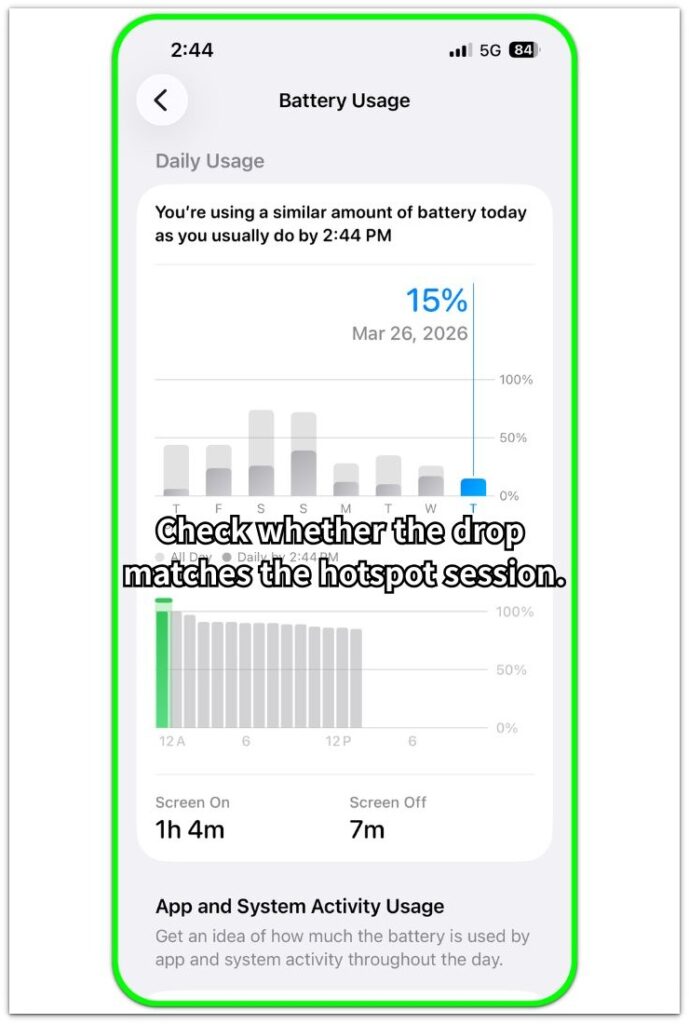
Use the connection the way you normally would for a short session, then check whether the battery drop looks unusually fast during that same period. Compare the battery percentage before and after the session, and see whether the drop matches the length of the connection.
A drop that looks too large for that session is the first pattern to watch. Compare it with the active hotspot window before treating the whole battery as broken.
Step 2: Check Whether More Than One Task Is Happening During Hotspot Use
Open Personal Hotspot settings and check what else is happening while the phone shares the connection. Use this screen to confirm that hotspot sharing is active, then review the battery drop with the rest of the phone activity.
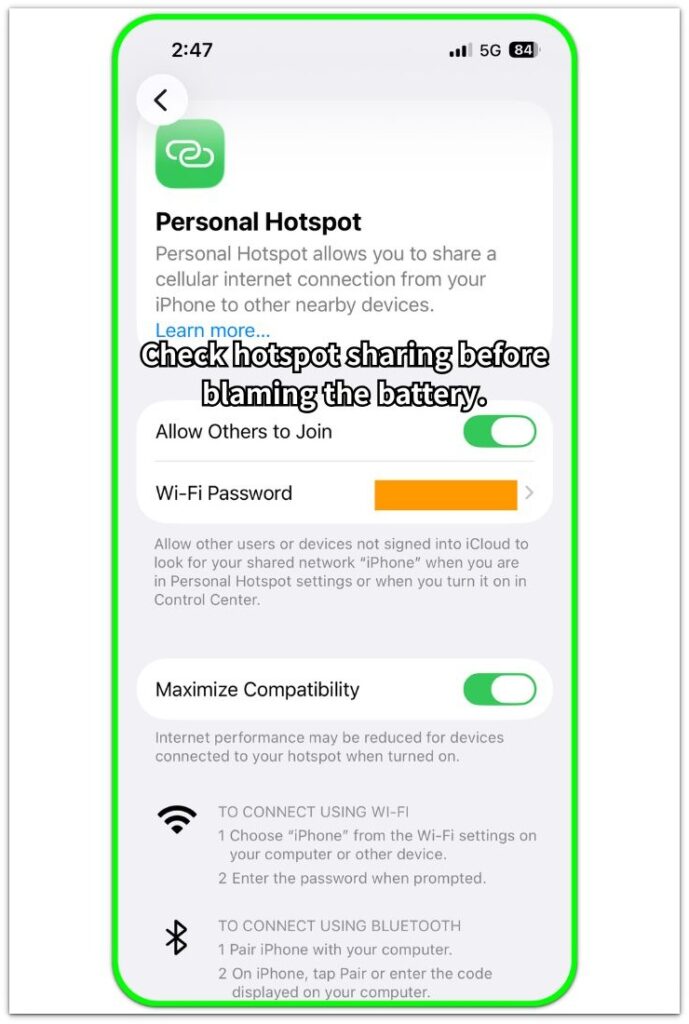
Check whether the iPhone is only sharing data or running another heavy task at the same time. Screen use, downloads, streaming, video calls, navigation, or charging heat can make the battery fall faster during the same session.
Also count how many devices connect, because one device and several devices do not create the same load. This check separates the sharing feature from the extra work happening around it, especially when another heavy task makes the drop look worse than Personal Hotspot alone would explain.
Step 3: Check Signal Conditions Before Judging the Battery Itself
Review the signal condition in the place where you use Personal Hotspot, not only the battery percentage drop. A basement, parking garage, thick-walled room, moving car, or another weak-signal area makes the iPhone work harder while it tries to keep the connection stable.
The battery falls faster even when the sharing feature itself works normally. Compare the same use in a stronger signal area before blaming the battery itself, because a much smaller drop there points back to signal condition as part of the drain.
Troubleshooting
Troubleshooting 1: Why iPhone Hotspot Battery Drain Feels Too Fast
A very fast battery drop during a short session should start with the connected device. Check what that device begins doing right after it connects, such as large downloads, cloud sync, app updates, backups, or video streaming.
That heavier pull makes the battery drop look like an iPhone-side problem. The connected device creates more demand than the short session suggests.
Troubleshooting 2: Battery Still Falls Fast Even When Hotspot Use Looks Light
When the connected device looks quiet but the battery still falls faster than expected, check what the iPhone is doing during that same session. Look for longer screen use, heat, recent app activity, or background work that keeps running.
The sharing session seems light, but the iPhone still has its own load. Hidden activity during the same period makes the battery drop look worse than simple connection sharing would suggest.
Troubleshooting 3: Battery Still Drops Fast After Basic Checks
After checking connected devices, iPhone activity, and signal conditions, a battery that still drops too fast needs one more comparison. Use the iPhone normally in another heavy situation, such as navigation, video calls, camera use, gaming, or long streaming.
Watch whether the battery falls in a similar way outside Personal Hotspot. A similar drop there points to a wider battery drain pattern, not one sharing session alone.
Extra Section 1: When the Battery Drop Looks Bigger Than the Hotspot Session
The first time I noticed this, the iPhone did not look broken. Personal Hotspot stayed on, one device joined, and the connection still worked normally.
The battery number made the session look worse than it was. It dropped faster than I expected for a short sharing session, so I had to separate the hotspot window from the rest of the day.
I checked how long the connection stayed active, then compared that time with the battery drop. Once I focused on that single sharing window, the pattern looked less random and easier to judge.
Extra Section 2: When the Connected Device Makes the Drop Look Heavier
Another time, the iPhone seemed to be only sharing a connection. I was not using the screen much, and Personal Hotspot was the main visible setting, but the battery still dropped faster than the short session seemed to explain.
The part I missed was the connected device. A laptop had started syncing files and loading updates shortly after it joined, so the iPhone was feeding a much heavier pull than I noticed at first.
From the iPhone side, it looked like a simple sharing session. After I checked what the other device was doing, the battery drop made more sense.
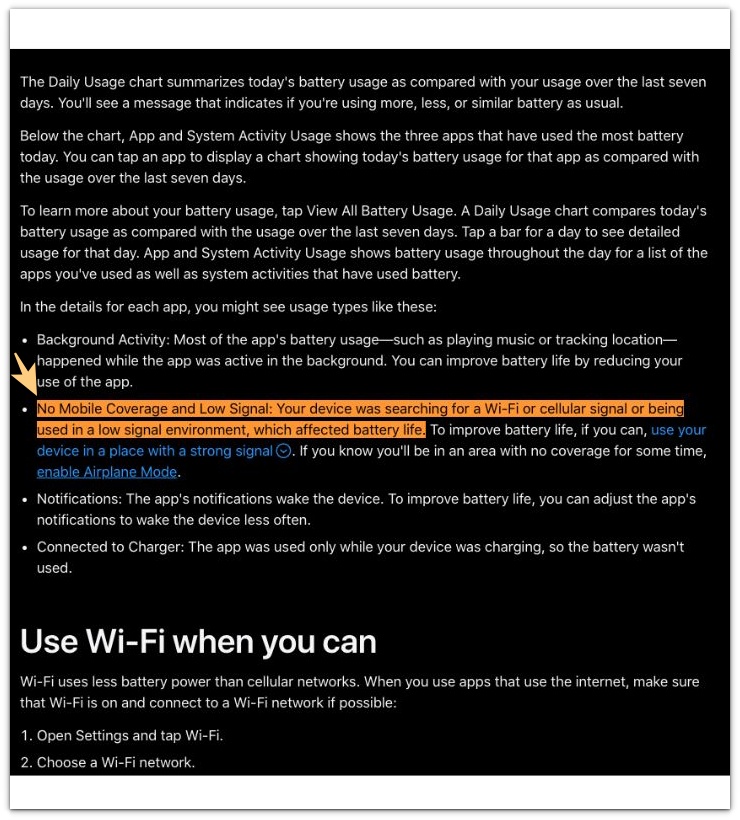
Official Source: Apple Says Low Signal Can Affect iPhone Battery Life
Apple says “No Mobile Coverage and Low Signal” can appear when an iPhone searches for Wi-Fi or cellular signal or works in a low-signal area, and that this can affect battery life.
This matters for iPhone hotspot battery drain because weak signal helps explain why the battery drops faster while Personal Hotspot still works normally.
Additional Tips
Keep sharing sessions shorter when possible, because a long session makes normal battery drain look worse than it really is. It also helps to place the phone where heat builds up less easily during hotspot use.
A cooler phone usually makes the battery drop feel more predictable. Check the battery pattern across a few normal sessions instead of judging it from one moment only.
Final Notes
Hotspot use does not automatically mean the iPhone battery is faulty. The important part is whether the battery drop stays tied to the active sharing session.
When iPhone hotspot battery drain shows up only during hotspot use, keep the focus there first. Check the session length, connected device activity, signal strength, and heat before blaming the battery itself.
If the same fast drop starts showing up outside hotspot use too, the issue is no longer just a Personal Hotspot pattern.
Checklist
- Hotspot battery drain starts soon after Personal Hotspot turns on
- The drop feels faster than the length of use would suggest
- The connected device is using more data than expected
- Weak signal or heat makes the session heavier
- Check whether battery drain also happens outside hotspot use.
For broader iPhone battery drain patterns, use the main guide to compare hotspot drain with other battery drop situations.