
Introduction
────────────────────
iPhone charging slow in car can be frustrating when the phone stays plugged in, but the battery level barely moves during the drive.
You expect the car charger to help while you use maps, music, or CarPlay, but the charge does not climb the way it does at home.
The problem is not always the iPhone itself.
A weak USB port, a low-output car adapter, heat, or heavy screen use can make the charge climb slower than expected.
Start by checking whether the charger is actually giving the iPhone enough power before you blame the battery.
────────────────────
Step-by-Step Guide
────────────────────
────────────────────
Step 1: Check The Car USB Port Before You Blame The iPhone
────────────────────
Start with the port you normally use in the car.
Plug the iPhone into the same car USB port and watch whether the battery level rises while the car is running.
Do not change the cable, adapter, app, and screen brightness all at once.
Some built-in car USB ports are better for connecting the phone than for charging it quickly.
If the battery barely moves from that port, test a higher-output car adapter before you blame the iPhone.
────────────────────
Step 2: Compare Charging With The Screen Off
────────────────────
Keep the same charger connected and turn the iPhone screen off for a short part of the drive.
Do this when you are not relying on the phone for directions.
Maps, music, CarPlay, and a bright screen can use power while the charger is trying to add power.
iPhone charging slow in car is easier to judge when you separate charging speed from screen use.
If the battery level rises better with the screen off, the charger likely cannot keep up with heavy use during the drive.
────────────────────
Step 3: Check The Cable And Adapter Fit
────────────────────
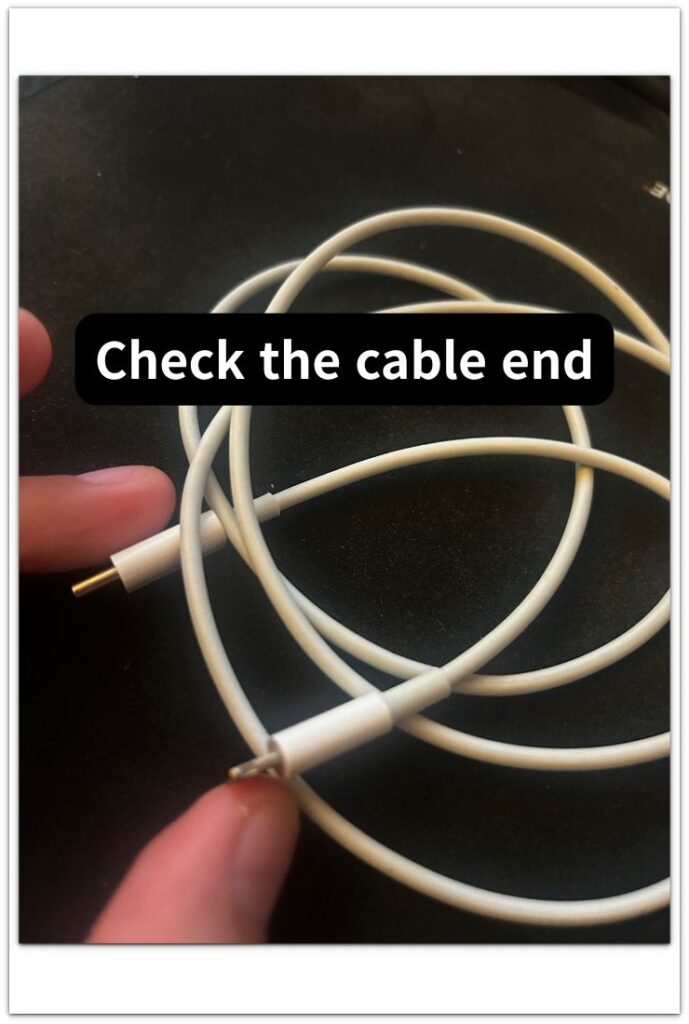
Look at the cable end and the adapter before you replace the charger.
A loose cable can keep the charging icon on the screen while the battery level still climbs slowly.
Push the cable in firmly and check whether it wiggles near the iPhone or the car adapter.
The image below shows the cable end to check when the charging icon appears but the battery level barely rises.
Then try the same adapter with a different cable if you have one nearby.
A better result with another cable points back to the original cable, not the car charger alone.
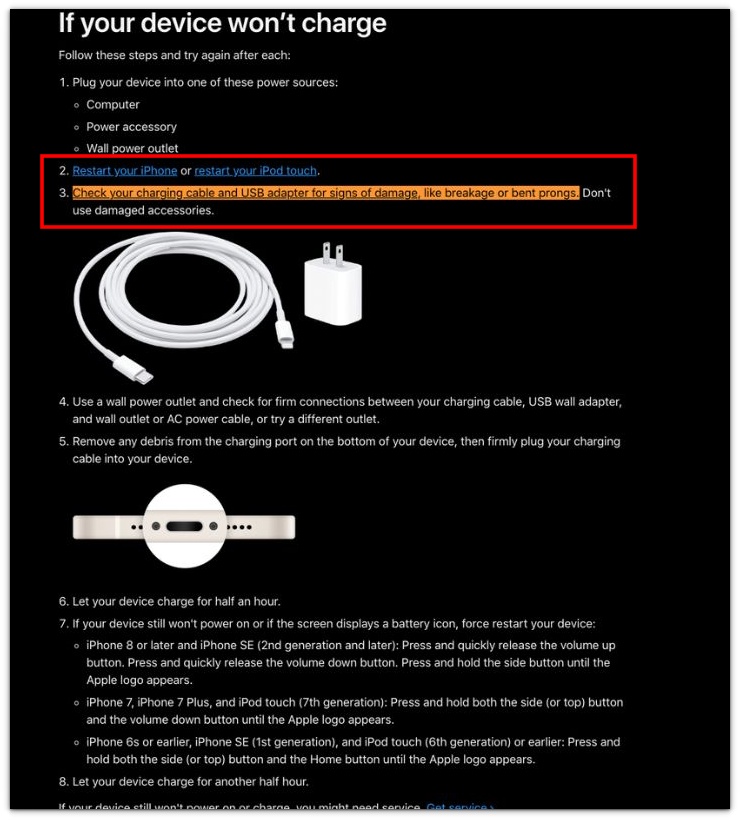
The screenshot below is from Apple’s official support page and shows that Apple recommends checking the charging cable and USB adapter for damage when an iPhone does not charge normally.
────────────────────
Troubleshooting
────────────────────
────────────────────
Troubleshooting 1: The Battery Barely Moves Even When The Screen Is Off
────────────────────
The charger can still look connected even when it is barely adding power.
Leave the screen off for part of the drive and check whether the battery level rises at all.
Do not judge it from the charging icon alone.
iPhone charging slow in car is easier to trace to weak power when the battery barely moves with the screen off.
Check the USB port, adapter output, and cable connection before you blame the iPhone battery.
────────────────────
Troubleshooting 2: The Phone Charges Better After You Stop Using Maps
────────────────────
Navigation can make the charger look weaker than it is.
The screen stays bright, GPS keeps working, and CarPlay or music can add more power use at the same time.
Test the same charger again when maps are not running.
A better result without navigation shows the charger is adding power, but not enough to stay ahead of heavy phone use during the drive.
That makes the car charging setup the first thing to check.
────────────────────
Troubleshooting 3: Charging Improves For A While, Then Slows Again
────────────────────
A short improvement does not always mean the problem is gone.
The cable can shift, the phone can warm up, or phone use can change between lighter and heavier moments during the drive.
Check whether the slowdown returns after the phone gets warm or after the cable moves near the adapter.
Do not replace the battery based on one short improvement.
When the slowdown keeps returning during the same drive, the charging setup deserves another check before the iPhone itself.
If the same charger looks weak with the screen off and a firm cable connection, a higher-output car charger is the safer upgrade before you blame the iPhone battery.
────────────────────
Additional Tips
────────────────────
Use the car charger only for one clean test before you decide anything.
Keep the same cable, same port, and same drive setup for that check.
iPhone charging slow in car can look worse on a short drive because the battery level has less time to rise.
Check the battery level before the drive and again after the drive ends.
Do not judge the charger while the phone is hot, the screen is bright, and navigation is running the whole time.
Testing with a cooler phone, a locked screen, and a higher-output car adapter shows whether the car setup can charge the iPhone properly.
────────────────────
Final Notes
────────────────────
iPhone charging slow in car is easier to judge when you separate the charger from everything the phone is doing during the drive.
A car USB port can keep the charging icon on without adding much power.
Navigation, heat, screen brightness, and a loose cable can make the same charger look weaker.
Do not replace the battery just because the charge barely moved during one drive.
Check the same car setup again with the screen off, a cooler phone, and a cable that fits firmly.
When the battery level rises better under those conditions, fix the car charging setup before you blame the iPhone battery.
────────────────────
Checklist
────────────────────
☐ Check the same car USB port before changing the cable or adapter.
☐ Test whether the battery level rises while the car is running.
☐ Turn the screen off for part of the drive when directions are not needed.
☐ Compare the battery level before the drive and after the drive ends.
☐ Check whether the cable fits firmly near the iPhone and the car adapter.
☐ Try a higher-output car adapter if the built-in USB port barely adds power.
☐ Avoid judging the charger while the phone is hot or navigation is running.
For a broader battery check, the guide above helps you tell whether the slow car charge comes from the charger setup or the battery itself.
────────────────────
Extra Section 1
────────────────────
I once trusted a car USB port because the charging icon appeared right away.
The iPhone stayed connected to the car screen, music played normally, and nothing looked broken.
After a short drive, the battery level had barely moved.
That made the port look normal on the screen but weak in real use.
iPhone charging slow in car became clearer after I checked the battery level instead of trusting the charging icon.
The port was still useful for the car screen connection, but it was not giving the phone enough power for that drive.
────────────────────
Extra Section 2
────────────────────
I once blamed the car charger during a long drive because the battery level barely moved.
The iPhone was plugged in the whole time, so I expected the battery to climb.
But I was also using maps, keeping the screen bright, playing audio, and checking the route every few minutes.
The charger looked weak because the battery level was not rising the way I expected.
Later, I tested the same charger again without using navigation.
I left the screen locked for part of the drive and checked the battery level after the car stopped.
The battery level climbed more during that cleaner check.
That told me the charger was adding power, but maps, screen brightness, and audio were using power almost as fast as the charger added it.