
Introduction
────────────────────
iPhone old charger is the first thing to check when your iPhone still charges, but the battery level rises more slowly than you expect.
You plug it in with the charger you have used for years, then come back later and see that the battery barely moved.
That does not automatically mean the iPhone battery is failing.
Do not judge the battery from the charging icon alone.
Start by checking whether the slower charge happens mainly with the old charger before you blame the phone.
────────────────────
Step-by-Step Guide
────────────────────
────────────────────
Step 1: Check The Old Charger Before You Change The Cable
────────────────────
Start with the charger you already use most often.
Plug in the iPhone with the same old charger and check how much the battery level rises after a normal charging period.
Do not change the cable, outlet, case, and phone position at the same time.
iPhone old charger becomes easier to judge when the first check starts with the charger instead of the phone.
That keeps the first result tied to the charger before you start testing other parts.
────────────────────
Step 2: Compare It With A Newer Charger Under The Same Conditions
────────────────────
Use the same iPhone in the same place before you make the next comparison.
Connect a newer charger and leave the phone alone for about the same amount of time.
Do not compare one check while using the phone with another check while the phone sits untouched.
Look at how much the battery level rises with each charger.
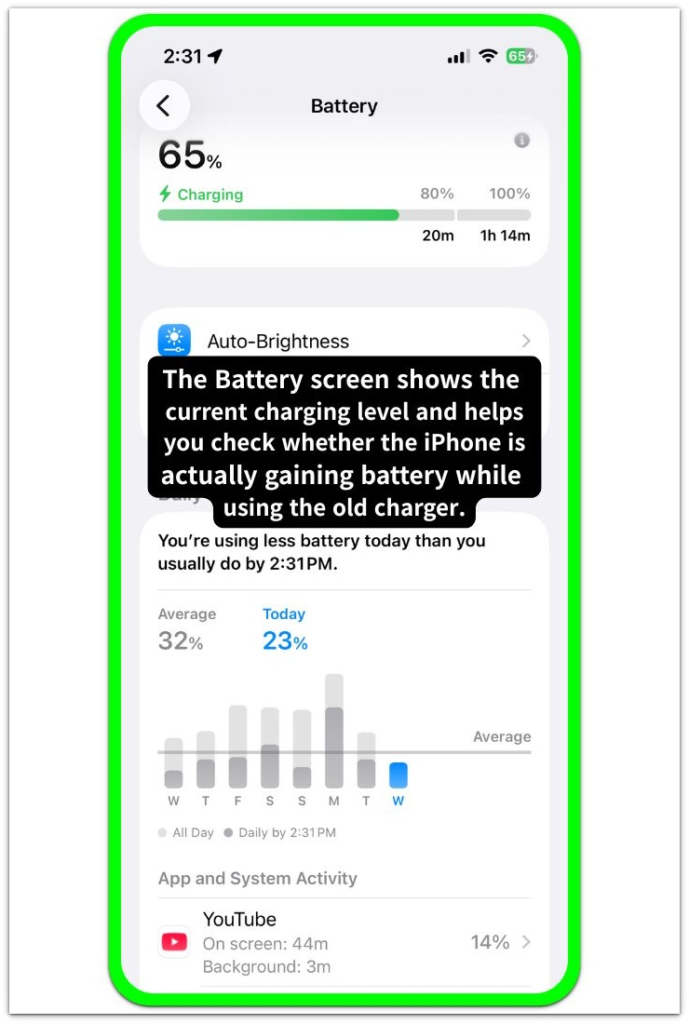
When the battery level rises faster with the newer charger under the same conditions, the old charger becomes the stronger suspect.
────────────────────
Step 3: Check Whether The Old Charger Still Fits Your Current iPhone Use
────────────────────
Think about how you use the iPhone while it charges.
An older charger can feel slow when the screen stays on, apps keep running, or the phone warms up during use.
That does not always mean the charger is broken.
The charger can simply be too weak for the way the iPhone is being used now.
Treat the old charger as the first suspect when the newer charger gives a stronger result in the same place with the same phone.
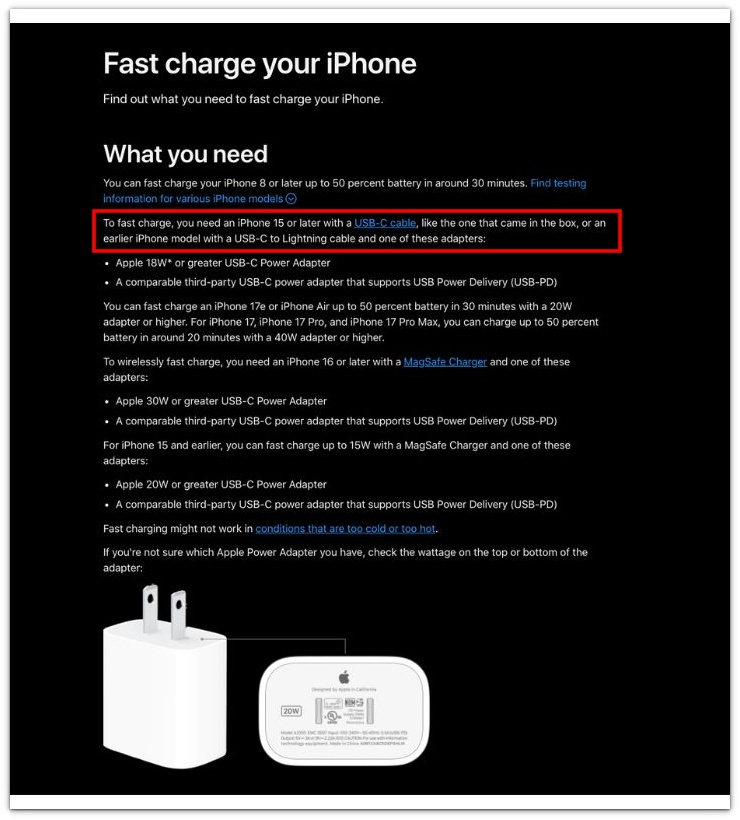
The screenshot below is from Apple’s official support page and shows that faster iPhone charging depends on the right cable and a strong enough power adapter.
────────────────────
Troubleshooting
────────────────────
────────────────────
Troubleshooting 1: The Old Charger Looks Fine But The Battery Still Rises Too Slowly
────────────────────
The charging icon can stay on even when the old charger is not giving the iPhone enough power for the battery level to rise normally.
Check the battery level again after leaving the phone alone for a while with the same charger.
Do not judge the charger only because the icon stays visible.
iPhone old charger becomes the stronger suspect when the icon stays on but the battery level barely moves.
That points back to the charger, not just the charging symbol.
────────────────────
Troubleshooting 2: The Charge Looks Better Until You Start Using The Phone
────────────────────
A weak charger can look acceptable while the iPhone sits untouched.
The slower result shows up more clearly when the screen stays on, navigation is active, or a video keeps playing during charging.
Check whether the battery rises less once you use the phone while it remains plugged in.
That does not prove the iPhone battery is failing.
It shows the charger is no longer keeping up with real use.
────────────────────
Troubleshooting 3: A Newer Charger Helps Once, But The Problem Comes Back
────────────────────
One better charge does not settle the issue.
Use the newer charger again in the same place with the same phone before you blame only the old charger.
A warm phone, loose cable, or busy app can still make charging look slow.
Check the result more than once before you replace anything.
The old charger stays suspicious only when the newer charger keeps giving the stronger result.
A repeated slow result with the old charger means the charger should be replaced before you blame the iPhone battery.
────────────────────
Additional Tips
────────────────────
Keep the old charger test simple.
Use the same cable first so a cable problem does not confuse the test.
Check the battery level after the iPhone sits plugged in for a normal amount of time.
Do not judge charging speed from the charging icon alone.
iPhone old charger checks are clearer when the cable and phone stay the same during the first comparison.
────────────────────
Final Notes
────────────────────
An old charger does not always fail all at once.
It can still show the charging icon while raising the battery level too slowly for the way you use your iPhone now.
iPhone old charger becomes the likely cause when the same phone charges better with a newer charger under the same conditions.
Do not replace the battery just because charging feels slow once.
Replace the charger first when the newer charger keeps raising the battery level faster in the same conditions.
────────────────────
Checklist
────────────────────
☐ Check the old charger before changing the cable.
☐ Use the same cable for the first comparison.
☐ Leave the iPhone alone while you compare charging speed.
☐ Compare the old charger with a newer charger in the same place.
☐ Watch how much the battery level rises, not just whether the charging icon appears.
☐ Treat the charger as the first suspect when the newer charger raises the battery level faster.
Read the guide above first if you want to check charging speed before you blame the iPhone battery.
────────────────────
Extra Section 1
────────────────────
I kept using the same old charger because it still showed the charging icon.
That made the charger feel safe to trust.
I would plug in the iPhone, see the icon appear, and stop thinking about the charger.
Later, the battery level had moved less than I expected.
That was the part I kept missing.
iPhone old charger became easier to judge once I stopped treating the charging icon as proof that the charger was still strong enough.
The icon only showed that the phone was connected.
It did not show whether the charger was giving the iPhone enough power to rise at a normal pace.
I started checking the actual battery level before blaming the battery or the cable.
────────────────────
Extra Section 2
────────────────────
I once blamed the cable before I blamed the charger.
The cable looked older, so it felt like the easier problem to explain.
I changed the cable first, but the battery level still moved slowly.
Then I started wondering whether the battery itself was getting weak.
That made the check messier than it needed to be.
I used the same cable with a newer charger and left the phone alone for the same amount of time.
The battery level rose faster with that setup.
That narrowed the problem back to the charger instead of the cable or the battery.