
Introduction
────────────────────
iphone storage full after reset describes a condition where available storage still appears completely used even though the device has just been reset and no user data has been restored yet.
This situation can appear inconsistent with the expected result of a reset.
Photos, applications, and personal files have already been removed.
Yet the storage bar may still show a nearly full capacity.
This behavior does not originate from visible user files.
It develops inside the system allocation layer that manages how storage blocks are rebuilt after a reset.
During a full reset, iOS removes user-managed containers and clears application data structures.
The storage map of the device is then reconstructed through internal allocation rebuilding.
That rebuilding phase recalculates system containers, temporary directories, and indexing structures that define how storage is distributed.
When this process has not fully completed, the storage interface can temporarily display a full or nearly full state.
User control ends at the reset process and the visible storage interface inside Settings → General → iPhone Storage.
The allocation rebuilding mechanism itself operates inside the system storage layer and cannot be controlled from the user interface.
────────────────────
Step-by-Step Guide
────────────────────
────────────────────
Step 1: Confirm the Storage Category Distribution
────────────────────
Open Settings → General → iPhone Storage.
Wait until the storage graph finishes calculating.
The interface often requires several seconds to rebuild its storage summary.
Check which category occupies most of the space.
If System Data, Other, or an undefined gray block dominates the chart, the storage usage is being reported from internal system allocation rather than visible user files.
If Photos, Apps, or Messages occupy the majority instead, the storage usage still belongs to user-managed data and follows a different diagnostic path.
This distinction helps explain why iphone storage full after reset can appear even when the device contains almost no visible user data.
────────────────────
Step 2: Observe Storage Behavior After Initial System Activity
────────────────────
Immediately after a reset, iOS continues running several background reconstruction processes.
These processes rebuild internal indexes, reconstruct application containers, and regenerate system cache structures.
Storage usage may fluctuate while the allocation rebuild process continues.
Leave the device idle for a period and observe whether the storage graph changes after background processes settle.
If the storage level gradually changes while no new apps are installed, the interface reflects an allocation rebuild rather than real storage usage.
If the storage value remains fixed in a full state without visible user data, the reporting layer may still be referencing an allocation map that has not been fully rebuilt.
────────────────────
Step 3: Identify Whether the Storage Display Reflects Allocation Rebuild
────────────────────
Compare the visible app list with the storage graph.
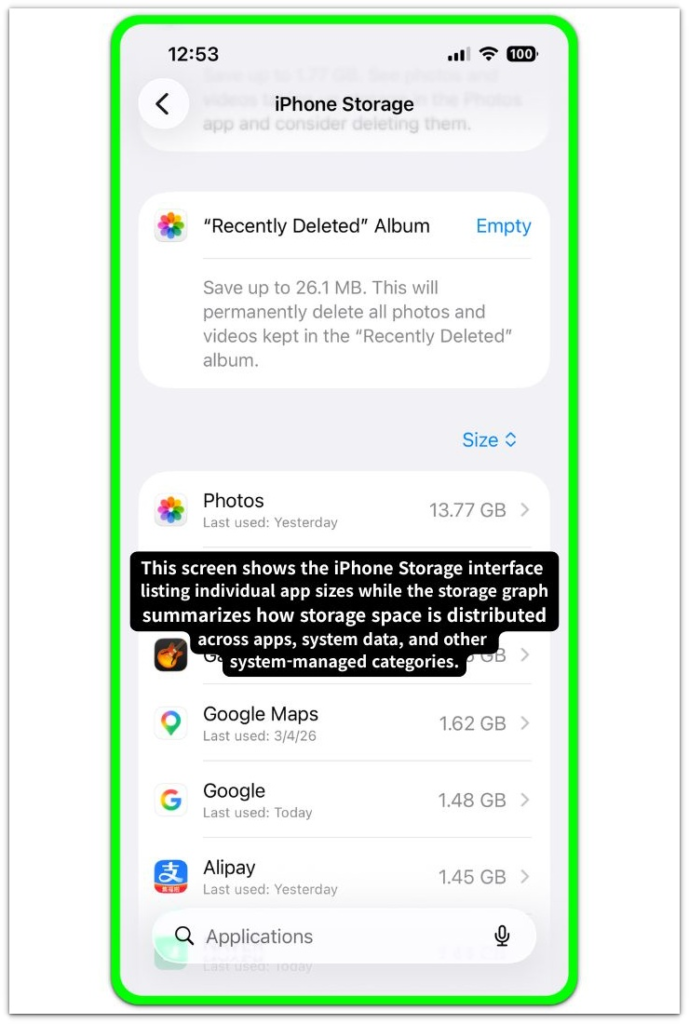
If the graph shows nearly full capacity while installed apps occupy only a small amount of space, the storage state does not come from user-managed data.
The storage interface reflects internal system allocation blocks that the system is still recalculating.
These blocks include system containers, indexing layers, and temporary rebuild structures created after the reset process.
When allocation rebuilding has not finalized yet, iphone storage full after reset can appear even though the device no longer contains large user files.
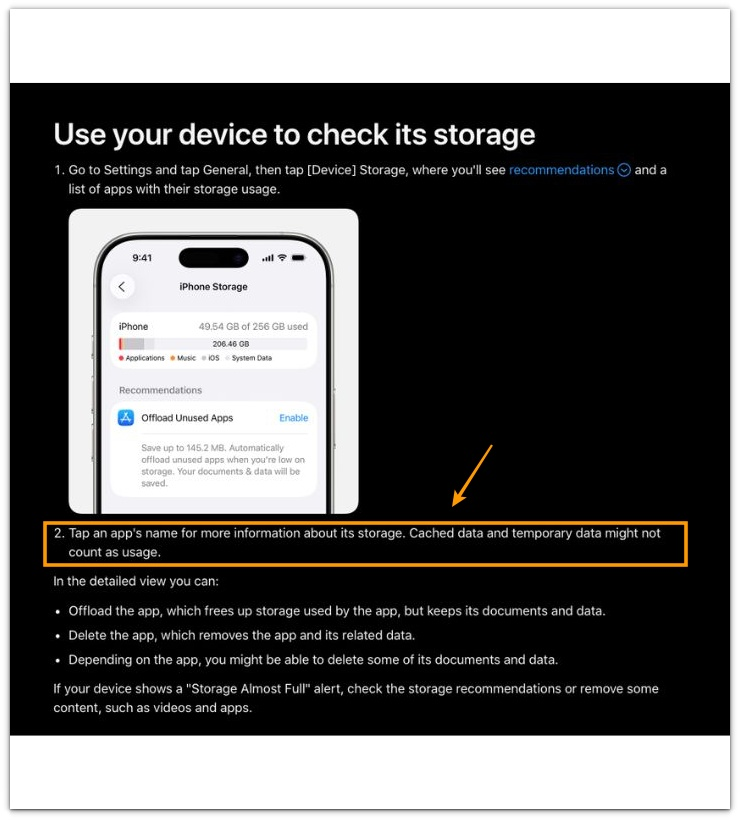
The official Apple documentation below shows how iOS reports storage usage and notes that cached and temporary data may not always be counted as visible storage usage.
────────────────────
Troubleshooting: iphone storage full after reset
────────────────────
────────────────────
Troubleshooting 1: Storage Graph Appears Full Even After Reset
────────────────────
Check whether the storage calculation has fully refreshed after the reset.
Open Settings → General → iPhone Storage and allow the device to finish recalculating the storage graph.
The first calculation after a reset may require additional time because the system is rebuilding internal storage indexes.
If the graph changes gradually after several minutes without installing new apps, the storage interface is still reflecting an ongoing allocation rebuild rather than a fixed storage condition.
If the storage value remains unchanged while the device contains almost no user data, the reporting layer may still be referencing allocation blocks that have not yet been reconciled.
────────────────────
Troubleshooting 2: Internal Allocation Blocks Rebuilding in Background
────────────────────
Confirm that no system synchronization process is rebuilding background containers.
After a reset, several services begin reconstructing internal storage structures.
Examples include photo library indexing, message database rebuilding, and system log container creation.
These processes temporarily occupy system-managed storage blocks while the rebuild tasks complete.
When these background rebuild tasks finish, iphone storage full after reset usually disappears as the storage allocation map stabilizes.
────────────────────
Troubleshooting 3: Storage Interface Reflecting Allocation Recalculation
────────────────────
Evaluate whether the storage display reflects allocation rebuilding rather than real file usage.
Compare the total size of installed applications with the storage graph shown at the top of the screen.
If the visible applications occupy only a small portion of storage while the graph still appears full, the remaining space is being reported from internal system allocation layers.
Those layers include rebuild containers, indexing structures, and temporary system directories created during the reset process.
When these structures finish recalculating their allocation blocks, the storage interface typically begins reflecting the corrected distribution of available space.
In cases where the storage interface continues showing inconsistent values after the system allocation rebuild appears complete, further inspection of the storage reporting layer may be required.
────────────────────
Additional Tips
────────────────────
A reset removes user-managed data but does not immediately finalize every internal storage calculation.
Several system components rebuild their internal structures after the reset process completes.
These components include search indexing services, system logging layers, and application container mapping tables.
During this rebuilding period, the storage interface may temporarily report allocation states that do not yet match the visible file structure of the device.
Leaving the device idle while connected to power allows the system to finish these background recalculation tasks more reliably.
Once these internal allocation layers settle, the iphone storage full after reset condition normally resolves as the system allocation map stabilizes.
────────────────────
Final Notes
────────────────────
The iphone storage full after reset condition appears because the system is still rebuilding internal storage allocation structures.
What appears as full storage after a reset is not actual file usage but a temporary state created while the system rebuilds its internal storage allocation map.
This situation does not originate from hidden user files or new data created after the reset.
A reset removes user content but triggers a separate internal phase where the system reconstructs its storage allocation map.
The storage interface may temporarily display conditions that do not match the current state of visible data while the system rebuilds its storage allocation map.
This behavior represents a reporting delay within the storage allocation layer rather than a persistent storage failure.
The storage state stabilizes once the allocation rebuild process finishes updating system containers and indexing structures.
────────────────────
Checklist
────────────────────
☐ Confirm that the storage graph has finished recalculating inside iPhone Storage
☐ Compare visible app sizes with the total storage graph distribution
☐ Allow time for background indexing and container rebuilding to finish
☐ Check whether the storage value changes after the device remains idle
☐ Verify that the storage display reflects allocation rebuilding rather than user file growth
Different iPhone models or storage sizes may complete the allocation rebuild at different speeds, so the temporary full state can last longer on some devices.
────────────────────
Extra Section 1
────────────────────
Users often notice the storage still looks full the first time they open the storage screen after a reset.
Many users check the device immediately after completing the reset and expect the storage bar to look almost empty.
Instead, the graph sometimes still shows a large System Data or gray section.
Many users check the storage interface before the system finishes rebuilding its internal allocation structure.
The reset removes user files, but the system storage map continues rebuilding its storage allocation map in the background.
The storage graph often changes gradually when the device stays idle for a while without installing new apps.
This pattern suggests the storage interface is still reflecting internal allocation rebuilding rather than real file usage.
────────────────────
Extra Section 2
────────────────────
Users often notice another pattern when they open the storage screen several times after a reset.
The storage graph sometimes looks slightly different each time even though no new files exist on the device.
In many cases the System Data section expands or shrinks while the installed apps remain the same.
This behavior usually indicates that the storage allocation map is still stabilizing.
Once the background rebuilding finishes, the storage graph begins reflecting the actual distribution of available space.
This pattern explains why iphone storage full after reset can appear even when the device contains almost no visible user data.