
Introduction
────────────────────
iPhone storage calculation taking long time describes a condition where the storage overview remains in a prolonged calculating state instead of presenting finalized category sizes.
The storage screen opens.
Category bars hesitate.
“Calculating…” does not complete within a reasonable interval.
This behavior does not indicate immediate storage damage.
The calculation layer does not read static values.
It enumerates allocation blocks, rebuilds temporary category indexes, and reconciles cached size data with actual usage records.
When reconciliation extends beyond expected duration, the interface appears stalled even though internal enumeration may still be active.
User interaction ends at the storage interface.
Index reconciliation operates beneath that visible layer.
This article defines where iphone storage calculation taking long time begins and where user control no longer influences reconciliation duration.
────────────────────
Step-by-Step Guide
────────────────────
────────────────────
Step 1: Confirm Active Calculation State
────────────────────
Open Settings → General → iPhone Storage.
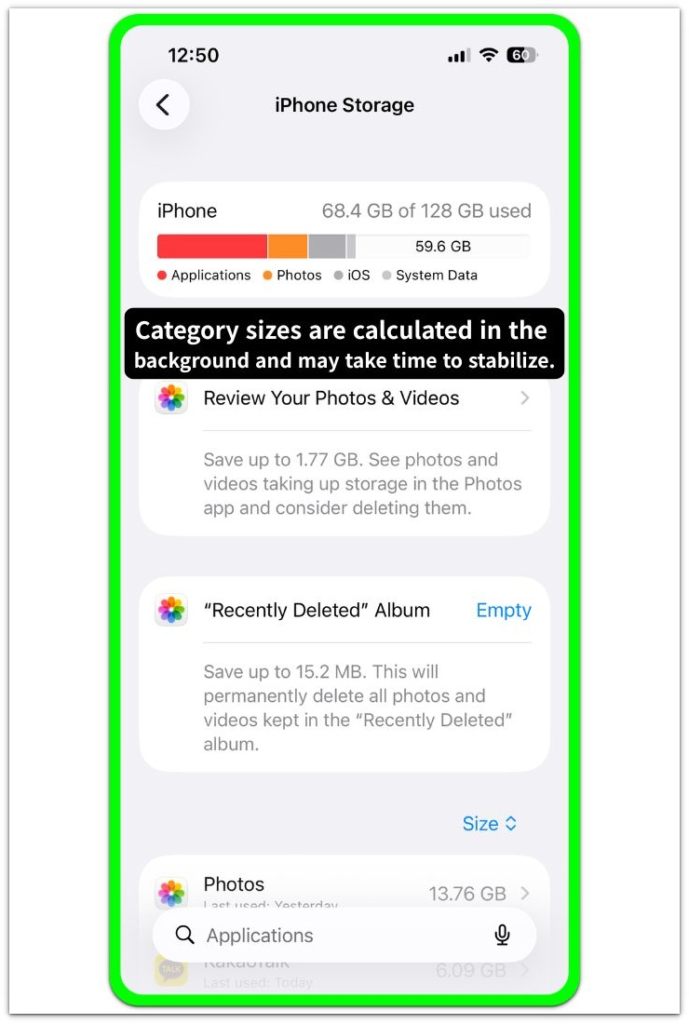
This screen is the storage summary interface where category sizes are calculated in the background before the bar fully reflects stable totals.
Even if “Calculating…” is not visible on your capture, the same interface can enter a calculating state when the bar is blank, partially rendered, or slow to refresh.
Stay on this screen for several minutes and avoid switching menus.
If the bar updates slowly or the numbers change after a delay, the calculation is still progressing rather than failing at the settings layer.
────────────────────
Step 2: Check for Recent System Changes
────────────────────
Determine whether an iOS update, device restore, or large data transfer occurred within the last 24–48 hours.
System updates and major data migrations often trigger extended category index rebuilding.
When this follows a system update or major data migration, prolonged calculation reflects re-indexing workload rather than interface failure.
────────────────────
Step 3: Evaluate Storage Volume Scale
────────────────────
Devices with high storage usage or large media libraries require longer enumeration cycles.
Extensive photo libraries, message attachments, and app cache clusters increase reconciliation duration.
The iphone storage calculation taking long time condition scales with allocation complexity.
────────────────────
Step 4: Distinguish Delay from Freeze
────────────────────
If the screen remains unchanged for an unusually long period without device activity, the process may be stalled.
If the interface remains responsive and device background activity is detectable, reconciliation is likely ongoing.
This distinction determines whether the condition is structural delay or calculation interruption.
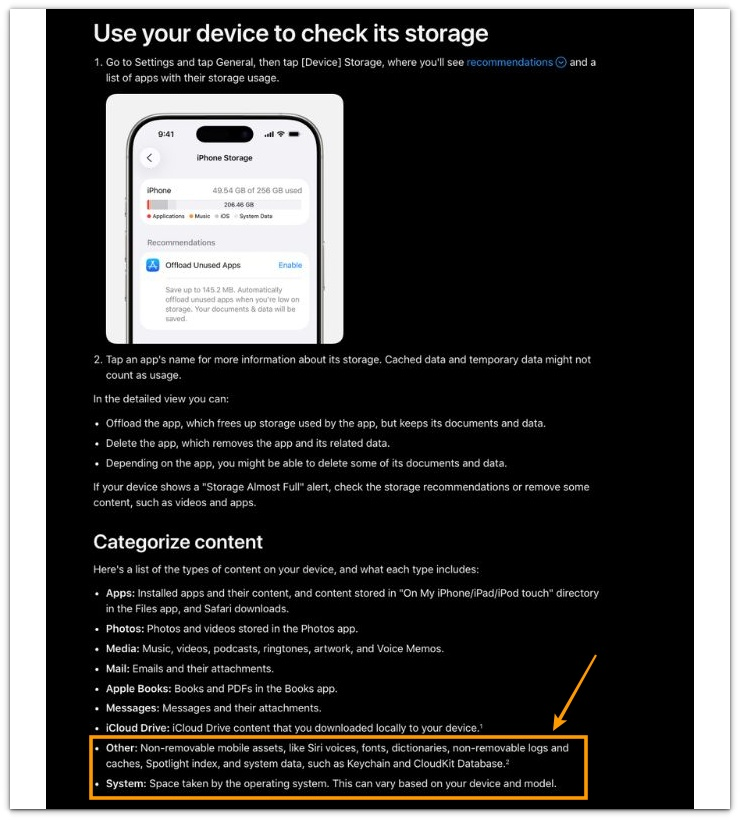
For reference, Apple explains how storage categories are calculated and why sizes may change over time in its official documentation below.
────────────────────
Troubleshooting: iphone storage calculation taking long time
────────────────────
────────────────────
Troubleshooting 1: Refresh the Storage Interface Session
────────────────────
Force close Settings, then open Settings → General → iPhone Storage again.
This checks whether the screen session stalled, not the calculation itself.
A stalled session stops refreshing the UI even when background enumeration continues.
If the bars redraw and the “Calculating” state restarts, the issue was the display layer, not the storage layer.
────────────────────
Troubleshooting 2: Reset the Background Worker Chain
────────────────────
Restart the iPhone, then go directly to Settings → General → iPhone Storage.
A restart clears temporary UI caches and resets several background workers that feed category summaries.
It does not “fix” storage by itself.
It forces the reconciliation job to reattach cleanly to the interface.
If calculation time improves after restart, the delay came from a stuck worker chain, not from actual disk damage.
────────────────────
Troubleshooting 3: Allow Index Rebuild Stabilization
────────────────────
Check whether a large change happened recently, then allow the device to idle correctly.
Examples: iOS update, restore, device-to-device transfer, major photo sync, large app reinstall.
Reconciliation duration behind iphone storage calculation taking long time grows when internal catalogs are rebuilding.
The storage screen waits for consistent category maps before showing stable numbers.
Connect to power, keep Wi-Fi on, and leave the screen off for a while.
That gives the index rebuild window the best conditions to complete.
This waiting period reflects background index rebuilding rather than a user-level malfunction.
If calculation remains stuck even after a proper idle stabilization window, the condition no longer belongs to the visible settings layer.
────────────────────
Additional Tips
────────────────────
Open iPhone Storage and avoid rapid back-and-forth navigation between screens.
Frequent screen switches can keep restarting the category summary refresh cycle.
That produces the feeling of “never finishing,” even when progress exists.
If the device is near full storage, iphone storage calculation taking long time becomes more persistent.
Near-full states reduce temporary working room for cache reorganization and catalog updates.
The UI can remain in a long calculation state because the system is negotiating space while it measures space.
After a major update or transfer, expect a long stabilization period.
The first completed result is often not final.
Category sizes may shift again once media databases and message attachments finish their own recount.
────────────────────
Final Notes
────────────────────
A long calculation time reflects internal enumeration workload rather than a simple settings fault.
User interaction can refresh the interface, yet iphone storage calculation taking long time is governed by system-level scheduling rules.
This condition is a structural visibility delay, not a user-controlled malfunction.
────────────────────
Checklist
────────────────────
☐ Close Settings and reopen iPhone Storage to rule out a stalled UI session
☐ Restart the iPhone to reset the worker chain feeding category summaries
☐ If an update or transfer occurred recently, allow a stable idle window with power and Wi-Fi on
☐ Reduce rapid screen navigation while calculation is active
☐ Treat near-full storage as a slower reconciliation state, not a quick-fix scenario
The storage screen reports the result of reconciliation.
It does not control reconciliation.
────────────────────
Extra Section 1
────────────────────
One observed case involved a storage screen remaining in the calculating state for nearly thirty minutes after a major iOS update.
Nothing moved on screen.
The category bars looked frozen.
It felt like a malfunction.
The device had completed the update the same morning.
Photos were syncing in the background.
Messages were rebuilding attachment previews.
After leaving the phone connected to power with Wi-Fi active and the screen off for about an hour, the storage page finally displayed stable numbers.
No reset was required.
No data was lost.
The delay reflected catalog rebuilding, not damage.
This pattern appears most often right after system changes.
The interface waits for internal tables to stabilize before presenting final category totals.
What looks broken is often a visibility gap between background indexing and front-end reporting.
────────────────────
Extra Section 2
────────────────────
Another situation involved a device that was nearly full.
The storage page stayed in calculation mode repeatedly, even after reopening the screen.
The device had less than 1GB of free space at that time.
Large video files and messaging attachments occupied most of the remaining blocks.
After removing several large videos and clearing redundant downloads, the calculation completed noticeably faster.
The system requires temporary working space to reconcile allocation maps.
When storage is critically low, reconciliation slows because the system negotiates space while measuring space.
The iphone storage calculation taking long time state was not random.
It reflected structural pressure on the allocation layer.
Once free space increased, category summaries stabilized and displayed normally.
The screen did not fix the issue.
Freeing structural pressure allowed reconciliation to complete.