
Introduction
────────────────────
iPhone shows charging but not charging is frustrating when the charging icon appears, but the battery percentage barely moves.
You plug in the cable, see the charging icon, and expect the battery percentage to start moving up.
Instead, the iPhone sits on the charger while the battery level barely changes.
That does not automatically prove the battery has failed.
Start by checking whether the battery percentage moves after a few minutes before you decide the iPhone has stopped charging.
────────────────────
Step-by-Step Guide
────────────────────
────────────────────
Step 1: Watch the Battery Percentage Before You Change Anything
────────────────────
Start with the same charger and cable that showed the charging icon.
Leave the iPhone plugged in for a few minutes without opening apps or moving the cable.
Check whether the battery percentage rises, stays the same, or drops while the charging icon is still showing.
The image below shows why the battery percentage matters more than the charging icon during the first check.
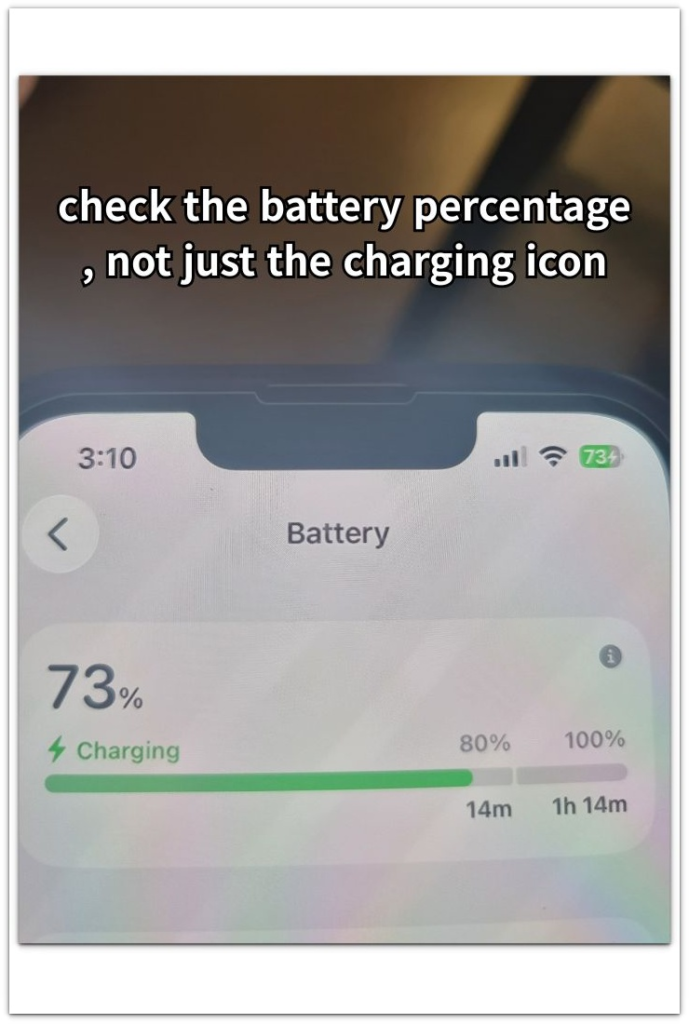
Do not unplug the charger, restart the iPhone, change the cable, and switch outlets all at once.
iPhone shows charging but not charging is easier to judge when the first check starts with the battery percentage, not only the charging icon.
────────────────────
Step 2: Check Whether the iPhone Is Using Power While It Charges
────────────────────
Keep the iPhone connected and look at what it is doing during the charge.
A bright screen, video, maps, camera use, hotspot, games, or a long background task can use power while the charger is connected.
Lock the screen and leave the iPhone alone for a short stretch.
Then check whether the battery percentage finally starts moving.
If it rises only when the screen stays off, the charger is working, but the iPhone was using too much power while it charged.
────────────────────
Step 3: Check the Cable, Port, and Power Source After the First Test
────────────────────
Now check the parts that can make the charging icon appear without giving the iPhone enough steady power.
Make sure the cable sits firmly in the charging port.
Look for lint, dust, or a loose connection near the port without forcing anything inside.
Try one trusted wall charger and one known-good cable.
A battery percentage that starts rising with the second setup points back to the first cable, adapter, outlet, or connection.
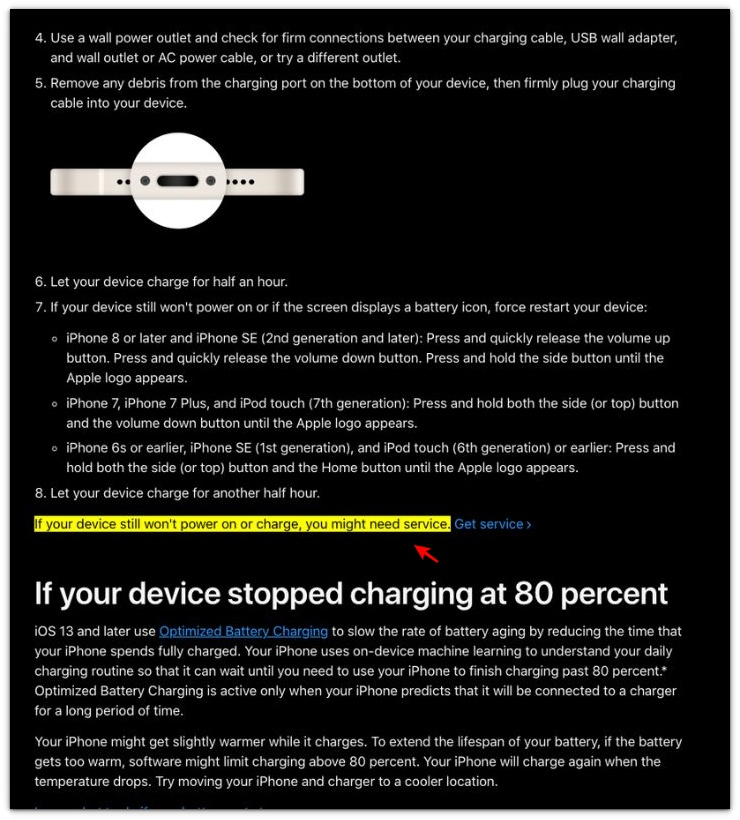
Apple says an iPhone that still will not charge might need service. That makes the battery percentage more important than the charging icon when the icon appears but the battery still does not move.
────────────────────
Troubleshooting
────────────────────
────────────────────
Troubleshooting 1: The Icon Shows, but the Battery Percentage Still Does Not Move
────────────────────
The charging icon can stay on the screen even when the battery percentage does not rise.
Leave the iPhone connected for a few more minutes with the screen locked.
Do not judge the charge from the icon alone.
Check the battery percentage again after the phone has been sitting still.
iPhone shows charging but not charging is easier to confirm when the same battery percentage stays in place with the screen off.
────────────────────
Troubleshooting 2: The Battery Looks Weak Only While the iPhone Is Being Used
────────────────────
A charge can look stuck when the iPhone is still doing too much in the background or on the screen.
Maps, video, hotspot, camera use, games, and long scrolling can make the battery percentage barely move.
Stop the active use and leave the phone alone for a short stretch.
If the battery starts rising after that, the charger is still delivering power, but the iPhone was using too much of it while connected.
────────────────────
Troubleshooting 3: The Battery Rises Once, Then Gets Stuck Again
────────────────────
A short improvement does not always mean the charging problem is gone.
The battery percentage can rise with one cable position, then stop again after the phone moves.
Check the same charger setup without bending the cable or lifting the phone.
A loose connection can make the charge look normal for a moment and weak again a few minutes later.
A battery percentage that stops rising again after one steady check points back to the charger, cable, or port.
The next step is a replacement cable or battery check when the battery percentage stays stuck after the cable connection has already been checked.
────────────────────
Additional Tips
────────────────────
Keep the first check simple.
Do not judge the iPhone from the charging icon alone.
Watch the battery percentage after the screen has stayed locked for a few minutes.
Try not to keep waking the screen every minute to see whether the battery moved.
That small habit can make the charge look weaker than it is.
Use one trusted wall charger before you blame the iPhone itself.
iPhone shows charging but not charging is clearer when the icon, battery percentage, and real charging setup are checked together.
────────────────────
Final Notes
────────────────────
A charging icon does not always prove the battery is really gaining power.
Check the battery percentage after the iPhone has stayed connected, locked, and still for a few minutes.
If the percentage starts moving after the screen stays off, the iPhone was using enough power to hide the charge while it was connected.
iPhone shows charging but not charging is easier to judge when you compare the charging icon with the battery percentage after one quiet check.
────────────────────
Checklist
────────────────────
☐ Checked the battery percentage, not only the charging icon.
☐ Left the iPhone connected with the screen locked for a few minutes.
☐ Avoided opening apps or moving the cable during the first check.
☐ Checked whether the battery percentage rose, stayed the same, or dropped.
☐ Tried one trusted wall charger and one known-good cable.
☐ Checked the charging port for lint, dust, or a loose connection.
☐ Compared the result before deciding the iPhone has stopped charging.
Use this main guide when the charging icon shows, but the battery percentage still does not move after the first simple check.
────────────────────
Extra Section 1
────────────────────
I once left the iPhone plugged in on a desk and trusted the charging icon too quickly.
The cable was connected, the charging icon was there, and nothing looked loose at first.
A few minutes later, the battery percentage had not moved.
That made the problem harder to read because the iPhone looked like it was charging.
I did not notice the cable sitting at a slight angle until I picked up the phone.
The connector had not fallen out.
It was just sitting a little unevenly against the case.
When I pushed the cable in straight and left the iPhone still, the battery percentage started moving again.
iPhone shows charging but not charging is easier to understand when the icon is treated as the first clue, not the final answer.
────────────────────
Extra Section 2
────────────────────
The iPhone was sitting beside me on the charger, and the battery percentage still barely changed.
Nothing heavy was open.
I was not watching video, using maps, or playing a game.
That made the slow movement harder to explain.
Then I noticed how often I kept waking the screen to check the battery.
I would tap the screen, read a notification, check the percentage, and put the iPhone down again.
Each check looked small, but I was not really leaving the phone alone.
When I stopped touching it for a short stretch, the battery percentage finally started moving.
The charger had not stopped working.
My checking habit was making the charge look weaker than it really was.