
Introduction
────────────────────
You plug in the iPhone, see the charging icon, and expect the battery to move normally.
A few minutes later, the battery percentage barely changes.
The iPhone looks connected to the charger.
The cable looks normal from the outside.
That makes the slow charge easy to blame on the battery, the adapter, or the cable first.
But the problem often starts inside the charging port.
Dust, lint, or small debris inside the port weakens the cable connection without fully blocking charging.
iPhone charging slow from a dirty charging port is easier to judge when the cable feels loose, the charging speed changes by position, or the same charger works better with another device.
────────────────────
Step-by-Step Guide
────────────────────
────────────────────
Step 1: Check Whether the Cable Sits Firmly in the Charging Port
────────────────────
Start with the way the cable fits when you plug it into the iPhone.
Do not move the cable around right away.
Push it in gently and see whether it sits firmly or feels loose.
A dirty charging port does not always stop charging completely.
The iPhone still shows the charging icon, but the connection is weak enough to slow the charge.
Watch the first few minutes without touching the cable.
iPhone charging slow from a dirty charging port is easier to suspect when the charging speed changes as the cable angle changes.
────────────────────
Step 2: Compare the Same Cable with Another Device
────────────────────
Use the same cable and charger with another device.
This helps separate a weak charger from a weak connection inside the iPhone port.
If the other device charges normally, the charger and cable are less suspicious.
Plug the cable back into the iPhone and check whether the fit still feels uneven.
Do not scrape the port or push anything sharp inside.
Do not start by trying to clean the port.
The goal is to see whether the same charger behaves differently only with this iPhone.
────────────────────
Step 3: Check the Port Area Before You Blame the Battery
────────────────────
See the photo below for the inside of the charging port to check before you blame the battery or charger.
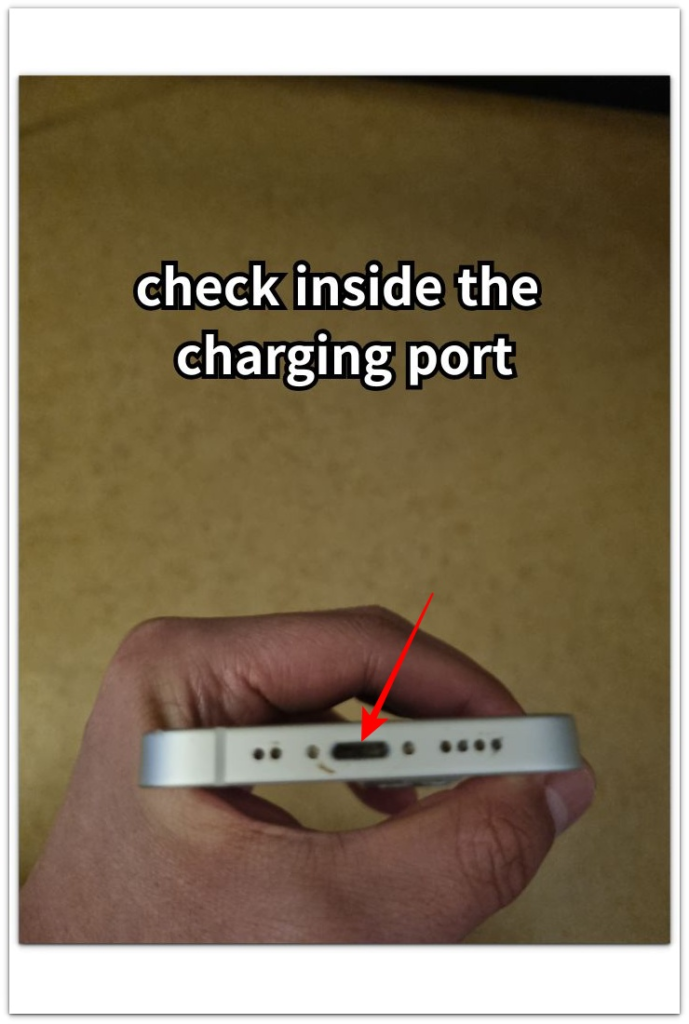
Look closely at the charging port under good light.
You are not looking for one huge piece of dirt.
Small lint, dust, or packed debris near the back of the port is enough to weaken the cable contact.
If the cable does not sit as deep as it should, the iPhone looks connected while the charge stays slow.
That makes the battery look weaker than it really is.
Before replacing the battery or buying another charger, check whether the port connection feels steady across more than one charge.
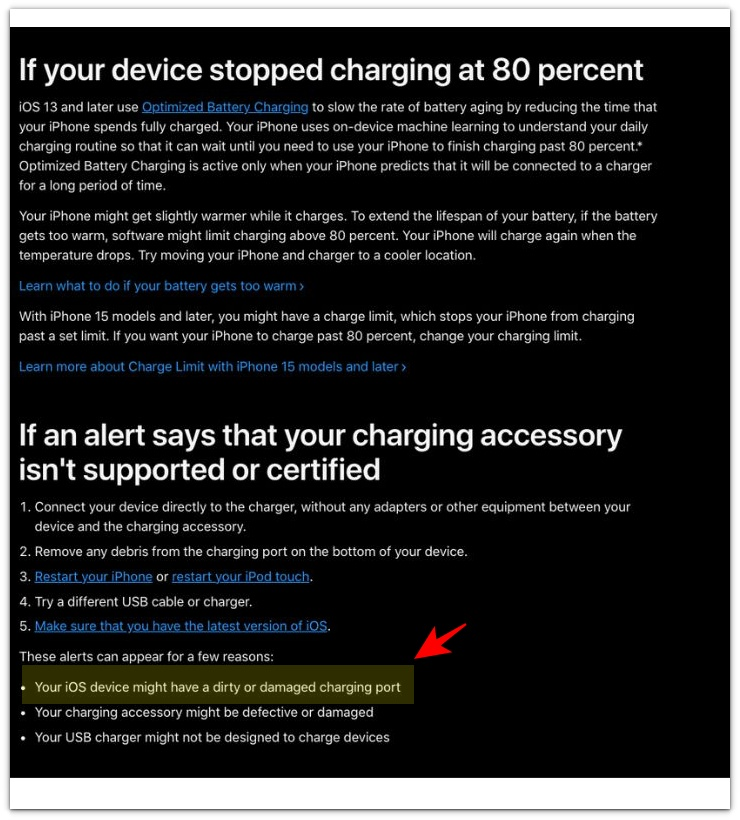
Apple notes that an iOS device might have a dirty or damaged charging port, so a loose cable fit should be treated as a clue, not the final answer.
────────────────────
Troubleshooting
────────────────────
────────────────────
Troubleshooting 1: The Charging Icon Appears, But the Battery Barely Moves
────────────────────
Do not judge the problem from the charging icon alone.
The icon only shows that the iPhone detects a charger.
It does not prove that the cable connection is strong enough to charge at a normal speed.
Leave the iPhone connected for a few minutes with the screen off.
If the percentage barely moves and the cable still feels loose, the problem points more toward the port connection than the battery.
iPhone charging slow from a dirty charging port becomes a stronger clue when the same charger works normally elsewhere, but this iPhone still charges weakly.
────────────────────
Troubleshooting 2: The Cable Only Works at a Certain Angle
────────────────────
Pay attention to the cable position.
If the iPhone charges better when the cable is held one way, the connection is not steady.
Do not keep bending the cable to force the charge.
That makes the problem harder to judge and puts more pressure on the port.
Unplug the cable, check the port area under good light, and compare the fit again.
A steady connection should not depend on holding the cable in one exact position.
────────────────────
Troubleshooting 3: The Port Looks Clean, But the Fit Still Feels Weak
────────────────────
A charging port does not need to look completely blocked to cause trouble.
Small lint or packed dust near the back of the port is easy to miss.
The cable still goes in, but it does not sit as deep as it should.
That weak fit makes the iPhone look connected while the charge stays slow.
If the port still feels uneven after a careful check, stop treating the battery as the first suspect.
Check the connection more closely before you replace the charger or judge the battery health.
If the cable still feels weak after a careful port check, replace the charging cable or have the port checked more closely.
────────────────────
Additional Tips
────────────────────
Keep the first check simple.
Use the same charger, cable, and outlet.
Do not twist the cable to keep the charge going.
A cable should sit firmly without being held in one position.
Check the port under good light before you blame the battery.
Do not push sharp objects into the charging port.
If the cable fit feels different each time you plug it in, stop and check the connection first.
If another device charges normally with the same charger, check the iPhone port again.
A slow charge is not always a battery warning.
The port fit matters before the battery becomes the main suspect.
────────────────────
Final Notes
────────────────────
A slow charge does not always mean the iPhone battery is failing.
The charging icon only proves that the iPhone detects a charger.
It does not prove that the cable is seated well.
Dust or lint inside the port weakens the connection before charging stops completely.
iPhone charging slow from a dirty charging port should be judged by the cable fit, the port condition, and whether the same charger works normally elsewhere.
Do not replace the battery based on one slow charge.
Check the port connection first, then judge the battery from normal use.
────────────────────
Checklist
────────────────────
☐ Checked whether the cable sits firmly in the iPhone charging port.
☐ Watched whether the charging icon stays on while the battery barely moves.
☐ Used the same charger, cable, and outlet for the first check.
☐ Compared the same charger with another device.
☐ Checked the port under good light.
☐ Avoided twisting the cable to force charging.
☐ Did not push sharp objects into the charging port.
☐ Checked whether the cable fit changes from one charge to another.
☐ Looked at the port connection before blaming the battery.
If the port looks clean but the iPhone still charges slowly, use the main iPhone charging slow guide to check the charger, cable, heat, and battery signs.
────────────────────
Extra Section 1
────────────────────
The tricky part was that the cable looked connected.
The charging icon appeared right away, so the port did not seem like the first problem.
I thought the charger was weak.
Then I thought the battery percentage was just taking too long to move.
But the cable did not feel the same each time I plugged it in.
One time it clicked in firmly.
Another time it stopped a little short, even though the charging icon still appeared.
That made the slow charge harder to understand.
The iPhone was not completely losing the charger connection.
It was accepting just enough contact to look connected.
iPhone charging slow from a dirty charging port made more sense when the cable fit changed before the battery percentage changed.
The problem was not the battery moving slowly by itself.
The first clue was the way the cable sat in the port.
────────────────────
Extra Section 2
────────────────────
The confusing part was that the same charger worked fine somewhere else.
I used it with another device, and the battery moved normally.
That made the charger look less suspicious.
The cable also looked fine from the outside.
But the iPhone still charged slowly when it sat on the desk.
The difference was the way the cable rested.
The phone was near the edge of the table, and the cable pulled slightly downward.
The charging icon stayed on, so the connection looked normal at first.
But the cable fit was not steady.
When the iPhone was moved closer to the charger, the cable sat straighter in the port.
The battery started moving more normally once the cable sat straight.
The charger and cable had not changed.
The weak point was the way the port connection reacted when the cable was under light pressure.