
Introduction
────────────────────
iPhone charging slow after 80 percent usually stands out when the battery level rises normally at first, then slows near the top.
You leave the phone plugged in longer than expected, but the last part of the charge does not rise as fast as the first part.
That slower finish can come from the way the iPhone manages charging near 80%, not just from a bad charger or cable.
Do not judge the charger from the charging icon alone.
Start by checking whether the slowdown happens again near the same battery level before you replace the charger.
────────────────────
Step-by-Step Guide
────────────────────
────────────────────
Step 1: Check Whether The Slowdown Starts Near 80 Percent
────────────────────
Start by watching the battery level before it reaches 80%.
Do not wait until the phone is already near full before you start checking.
Keep the same charger connected and look at whether the charging speed changes around the same point.
iPhone charging slow after 80 percent is easier to judge when the first part of the charge looks normal, then the slowdown starts near the top.
That gives you a clearer reason to tell normal charging behavior apart from a weak charger.
────────────────────
Step 2: Leave The Same Charger Connected Long Enough To Compare The Finish
────────────────────
Keep the phone plugged in while the last part of the charge finishes.
Do not switch the cable, wall adapter, outlet, and phone position during this check.
Watch whether the battery keeps moving slowly but steadily, or almost stops for a long stretch.
A slower finish is not the same as a failed charge.
This shows whether the phone is still charging, only at a slower pace near the top.
────────────────────
Step 3: Check Heat And Charging Settings Before You Blame The Cable
────────────────────
Look at where the phone is sitting while it charges.
A warm room, a case, direct sunlight, or heavy use during charging can make the last part feel slower.
Then check whether charging settings are controlling how the iPhone finishes the charge.
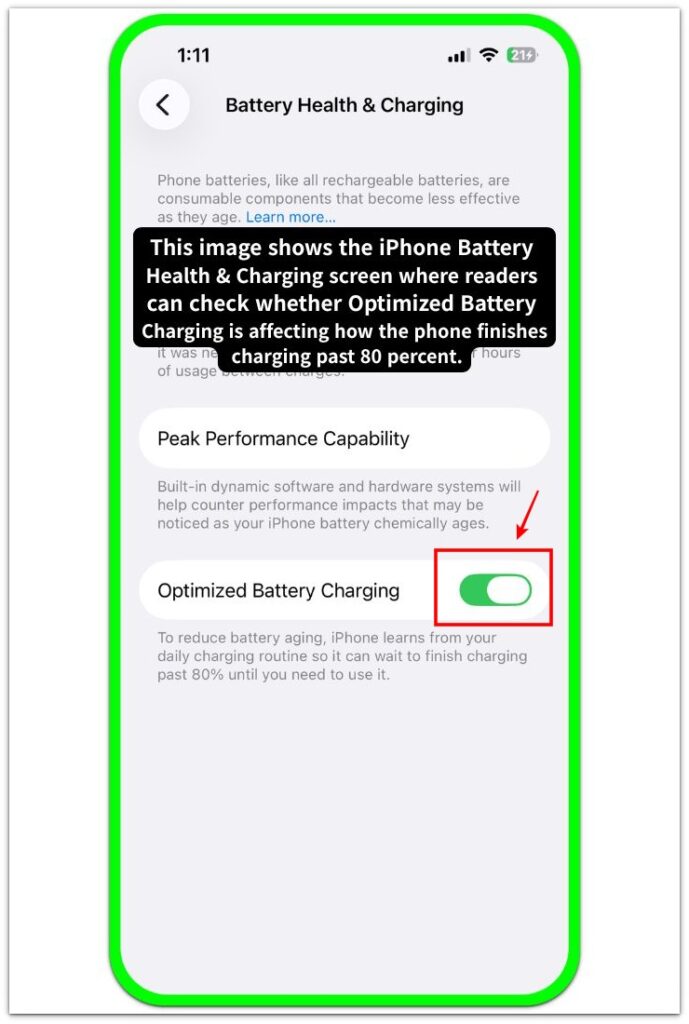
Do not replace the charger first when the slowdown keeps happening near the same battery level.
When the same slowdown repeats, check the charging settings and heat before buying another charger.
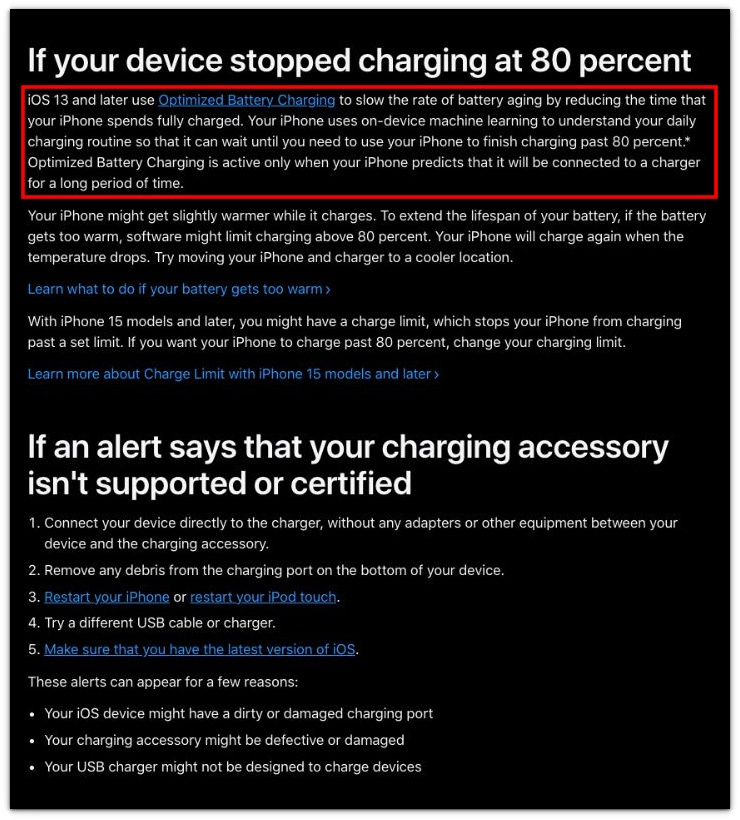
Apple explains that iPhone can slow or delay charging past 80 percent through Optimized Battery Charging, heat control, or charge limits on newer models. That does not mean every slow finish is harmless, so the check below focuses on whether the slowdown repeats under the same charging setup.
────────────────────
Troubleshooting
────────────────────
────────────────────
Troubleshooting 1: The Battery Keeps Moving Slowly Even When Nothing Looks Wrong
────────────────────
The phone can still look normal on the charger while the battery moves slower than expected.
The charging icon stays on, the cable looks connected, and no warning appears on the screen.
That can make the slowdown feel like a charger problem at first.
Check whether the same slow finish appears again with the same charger before you replace the charger.
iPhone charging slow after 80 percent can look confusing because the phone still shows charging while the last part barely moves.
────────────────────
Troubleshooting 2: The Slow Finish Shows Up More Clearly After You Leave The Phone Alone
────────────────────
A charge can look less serious while you are using the phone.
You check it once, see the battery still rising, and think the problem is not worth worrying about.
Then you put the phone down and come back later, but the last part still has not moved much.
That delayed check matters because active use can hide how slow the finish really is.
Use the next quiet charge to see whether the same slow finish comes back.
────────────────────
Troubleshooting 3: One Faster Charge Does Not Mean The Issue Is Gone
────────────────────
One charge can finish faster and make the slowdown look solved.
That can happen when the phone is cooler, used less, or sitting in a better spot.
Do not treat one better finish as the final answer.
Check the next normal charge before you decide the charger is fine.
When the same slow finish comes back, that one faster charge becomes less convincing.
Once that same slow finish returns after one better charge, use a battery tester to check the battery and charging condition.
────────────────────
Additional Tips
────────────────────
Do not test the charger only from 90% or higher.
Start one check before the slowdown usually begins, then watch how the phone finishes the charge.
Keep the phone out of direct sunlight while it charges.
Remove a thick case if the phone feels warm during the last part of charging.
iPhone charging slow after 80 percent is easier to judge when the charger, heat, and phone use stay the same for one charge.
Use one normal charge as a comparison before buying a new cable or adapter.
────────────────────
Final Notes
────────────────────
iPhone charging slow after 80 percent does not always mean the charger is failing.
The slowdown matters more when it starts near the same battery level again.
When the phone charges normally at first and then slows near the top, check the same level again on another normal charge.
Heat, charging settings, and the way iOS manages charging can all affect the last part.
Replace the charger only after the same slow finish keeps showing up under the same simple setup.
────────────────────
Checklist
────────────────────
☐ Check whether the slowdown starts near the same battery level again.
☐ Keep the same charger connected during one simple charge check.
☐ Watch whether the last part moves slowly or almost stops.
☐ Check heat, case thickness, and phone use before blaming the cable.
☐ Compare one normal charge before buying a new adapter.
☐ Replace the charger only when the same slow finish keeps coming back.
If you want the wider charging check first, the guide above helps you separate a slow 80% finish from a charger or battery problem.
────────────────────
Extra Section 1
────────────────────
I blamed the charger first because the phone still looked like it was charging.
The cable was connected, the charging icon stayed on, and nothing on the screen looked broken.
Then I noticed the first part of the charge moved normally.
The slower part kept showing up near the top, not from the moment I plugged in the phone.
That changed how I looked at the problem.
iPhone charging slow after 80 percent made more sense once I stopped judging the charger from the charging icon alone.
The phone was still charging, but the last part was not moving the same way as the earlier part.
I checked where the slowdown started before deciding whether the charger was really weak.
────────────────────
Extra Section 2
────────────────────
One charge finished faster, so I almost stopped checking it.
The phone was cooler that time, and I was not using it much while it charged.
The last part moved better than before, so the earlier slowdown looked less serious for a moment.
Then the next normal charge brought back the same slow finish.
That second look mattered more than the one better charge.
It showed me that a faster finish once does not prove the charger is fine.
I compared the next charge under the same simple setup before deciding whether the charger was actually the problem.