
Introduction
iPhone Storage Recommendations Not Showing happens when the Storage screen loads, but no recommendation cards appear. The storage bar still shows at the top, and the app list still appears below it, so the screen does not look completely broken.
The missing recommendation area is the part to check first before changing storage settings.
Step-by-Step Guide for iPhone Storage Recommendations Not Showing
Step 1: Check the Missing Section First
Open Settings, then General, then iPhone Storage. Wait until the storage bar finishes loading at the top of the screen.
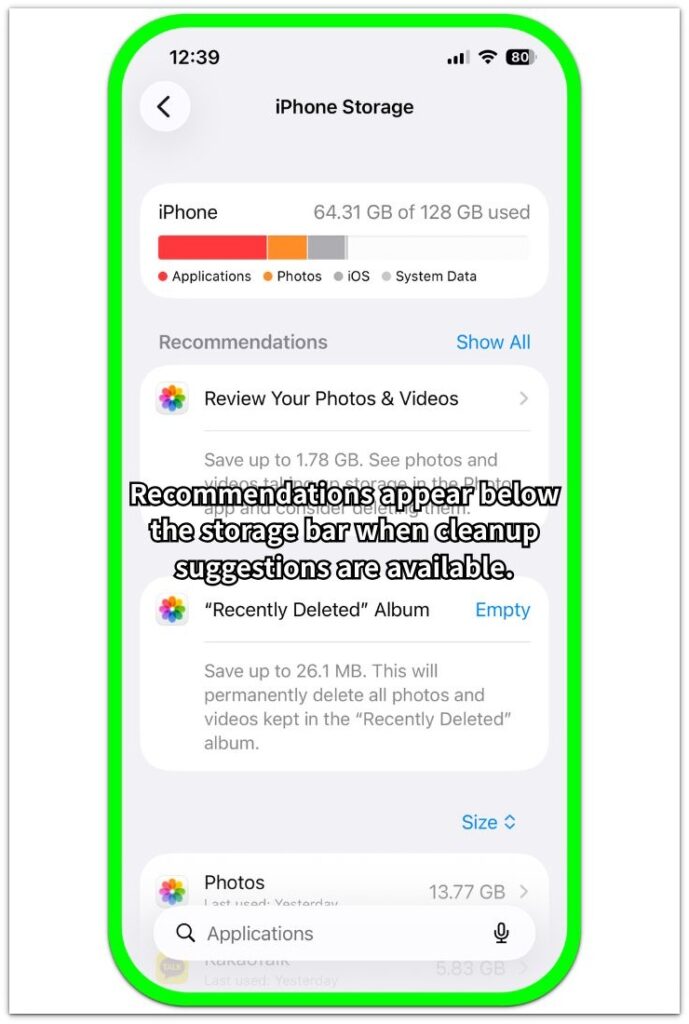
Look just below the storage bar before checking the app list. This area normally appears near the top of iPhone Storage, above the installed apps.
Cards appearing there mean the section is loading normally. When the storage bar and app list appear but that area stays blank, focus on the missing recommendation section first instead of judging the screen from the top summary alone.
Step 2: Check Whether the iPhone Has Enough Free Space
Check the storage summary at the top of the screen. No recommendation cards appearing there does not always mean the section is broken.
Look at how much storage is used and how much space remains. A nearly full storage summary gives iOS more reason to show cleanup suggestions, while plenty of free space explains why the recommendation area stays empty.
This check separates a truly missing suggestion area from a page that is still loading.
Step 3: Review the Storage Categories That Usually Create Recommendations
Stay on the screen and review the storage entries below the summary. Check whether any category stands out, such as Photos, Messages, large apps, offline media, or apps you rarely use.
These are the kinds of items that often lead to storage suggestions. When nothing looks large enough to clean up, the page often shows only the storage bar and the app list.
Leave the apps alone for this check. The point is to see whether the phone has obvious storage items that would normally create recommendation cards.
When the page loads normally but no large cleanup target appears, iOS likely has no useful suggestion to show yet.
Troubleshooting
Troubleshooting 1: iPhone Storage Recommendations Not Showing While Storage Is Still Loading
The iPhone Storage page does not always show recommendation cards before the page finishes updating, so wait until the storage numbers stop changing and the app list settles.
Check the space above the installed apps again. Cards appearing after the wait means the page was still finishing its storage check. When the area stays blank after the page settles, move on to the next check instead of refreshing it over and over.
Troubleshooting 2: There Is No Large Cleanup Target Yet
Look for one storage category that clearly takes up more space than the others. Photos, Messages, downloaded videos, offline music, and large apps are the main items to compare.
Balanced storage use with no standout category means the iPhone does not have an obvious cleanup target to suggest. Leave the apps alone here instead of deleting random ones just to force recommendation cards to appear.
The better check is whether the screen shows a real item worth cleaning up. When nothing obvious stands out, a blank recommendation area is less likely to be a screen error.
Troubleshooting 3: The Screen Changed After an iOS Update
Think about whether the recommendation area disappeared after an iOS update, restore, or large storage cleanup. The iPhone Storage screen often needs time to settle again after those changes.
Open the storage page later and compare the same area again. Check whether the storage bar, app list, and app sizes look stable before changing storage settings again.
A normal-looking screen with only the cards missing should keep the focus on whether iOS has a useful suggestion to show. When the cards still do not appear after the page stays stable, move to the final review.
Extra Section 1: When Free Space Looks Comfortable but Recommendations Stay Missing
A user opens iPhone Storage and expects to see cleanup recommendations right away. The storage bar appears at the top, and the app list appears below it, so nothing looks broken, but the recommendation cards are still missing.
This feels confusing when the phone still has many apps, photos, and messages on it. The important detail is how full the storage actually looks.
Comfortable free space gives iOS less reason to show an urgent cleanup suggestion. The better check is whether free space still looks comfortable and no single item stands out.
When the rest of the page looks complete, the phone likely does not have a clear storage suggestion yet.
Extra Section 2: When Recommendations Disappear After You Clean Up Storage
A user clears photos, deletes large videos, or removes apps, then opens iPhone Storage again. The storage summary now shows more free space than before, and the installed apps still load normally, but the expected cleanup cards are no longer there.
This situation is different from a screen that never loaded correctly. The iPhone already has less storage pressure after the cleanup, so check what changed before the recommendation area disappeared.
Large photos, videos, attachments, or unused apps already removed means iOS has fewer cleanup suggestions left to show. Leave the apps alone instead of deleting more just to bring the recommendation cards back.
The better check is whether the storage bar improved and whether the largest items already became smaller. When the page looks stable after cleanup, the missing recommendation area matches the storage change more than a broken screen.
Official Source Title: How to check the storage on your iPhone and iPad
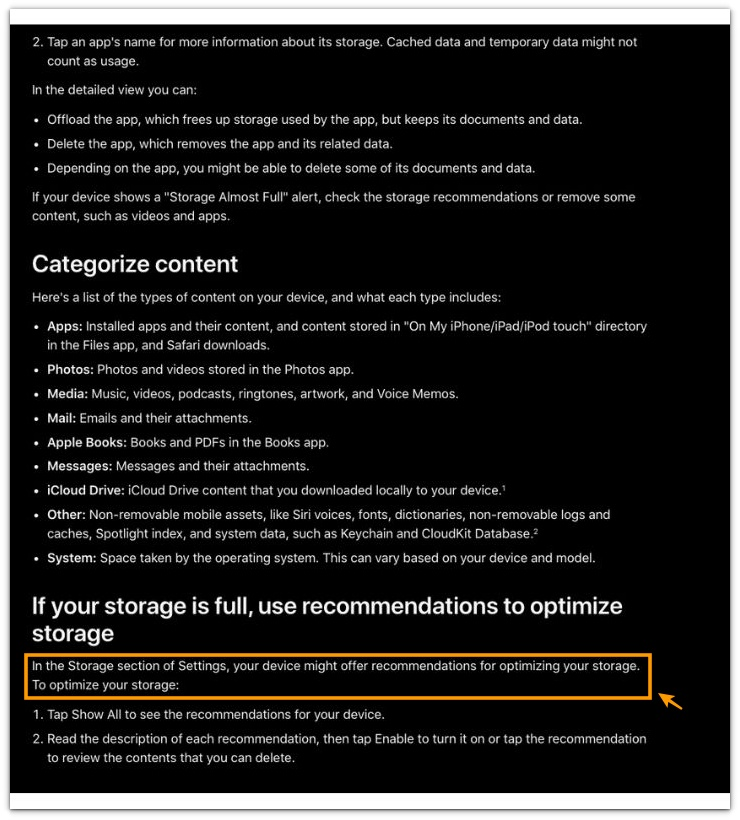
In the Storage section of Settings, your device might offer recommendations for optimizing your storage.
Apple describes storage recommendations as optional suggestions, so a missing area should be checked with the storage bar and app list before treating it as a broken screen.
Additional Tips
Give the iPhone Storage screen a short time to finish loading, and keep Settings open instead of closing and reopening it.
Check the top summary, missing section, and installed apps together. Look at Photos, Messages, downloaded media, and large apps before deleting anything.
Leave random apps alone instead of trying to force cards to appear. When the page loads normally and no large item stands out, check it again later.
Final Notes
iPhone Storage Recommendations Not Showing is not a screen failure by itself. When the top summary loads, installed apps appear, and app sizes look stable, the screen is working.
The missing recommendation area points to the recommendation trigger, not the whole storage page. Enough free space or already-cleaned large items give iOS no strong reason to show a cleanup card.
Treat this as a missing suggestion first, not a broken storage screen. Only suspect a deeper storage problem when the top summary will not load, installed apps stay missing, or the numbers keep changing without settling.
Checklist
- Check whether the recommendation area is missing near the top of the iPhone Storage screen
- Wait until the storage bar and app list finish loading
- Check whether the iPhone still has enough free space
- Review Photos, Messages, downloaded media, and large apps
- Check whether the storage bar or app list also fails to load
Use this guide when the missing recommendation cards do not explain the whole storage problem.