
Introduction
iPhone gets hot while charging becomes noticeable when one part of the phone feels hotter than the rest.
The heat is not spread evenly across the back.
One area feels hotter near the camera bump, the center of the back, or the charging port area.
The phone still charges normally, and the screen shows no warning.
The first clue is the repeated warm area you feel each time you pick up the iPhone during charging.
Start by checking where the heat begins, whether it stays in that area, and whether it gets stronger during the charge.
Step-by-Step Guide for When iPhone Gets Hot While Charging
Step 1: Check Where the Heat Feels Strongest
Lift the iPhone while it is still connected to the charger.
Do not judge the heat from one quick touch.
Feel the camera area, the center of the back, and the charging port area separately.
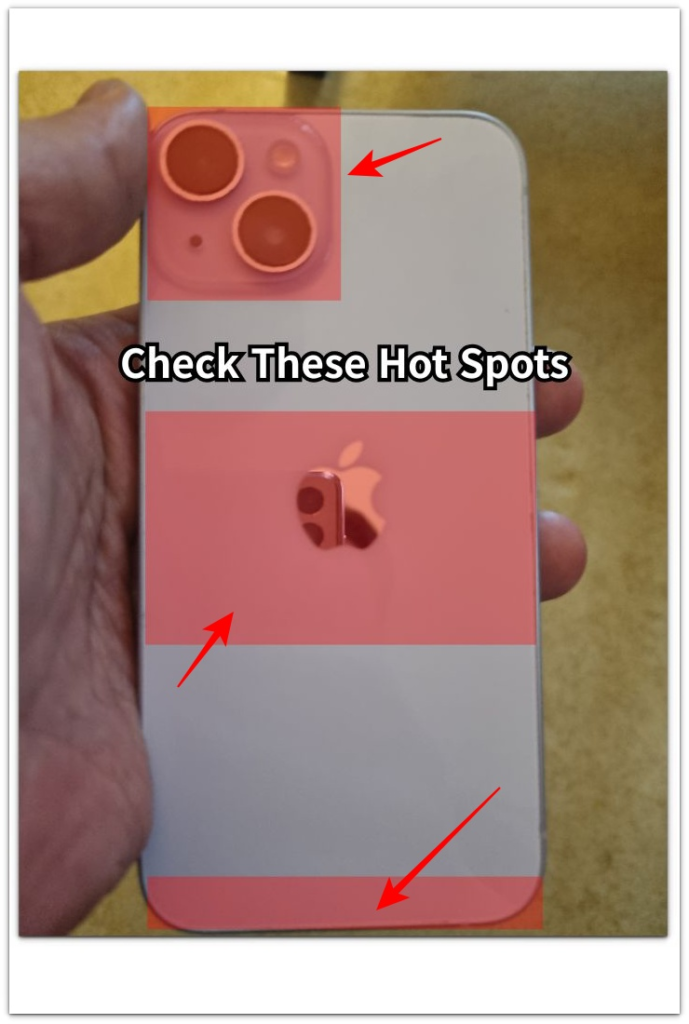
The goal is to see whether the whole back feels mildly warm or one spot feels clearly hotter.
Check that area again after a few minutes.
If the same spot keeps feeling sharper or more uncomfortable than the rest, treat that area as the starting clue.
Step 2: Remove Anything Holding Heat Against the Phone
Take the iPhone out of its case.
Move it away from fabric, bedding, a couch, or direct sunlight.
Place it on a hard, open surface while it stays plugged in.
Leave it there for a few minutes before checking that hot area again.
The useful sign is whether that area softens after the phone has room to release heat.
Step 3: Stop Active Use and Feel the Phone Again
Lock the screen first, then check whether the same hot area stays strong.
Do not stream video, play games, record, use maps, or keep the screen bright during this check.
Pick up the phone again after a short quiet period and feel the same area you checked earlier.
After the screen stays locked, a cooler body tells you active use was adding heat during charging.
But when the same hot area stays strong while the iPhone sits idle, unplug it and let it cool before charging again.
Troubleshooting
Troubleshooting 1: The Charging Port Area Feels Hot First
The first warning sign is heat that starts near the charging port area instead of spreading across the back.
Check the port area, cable end, and lower edge of the phone.
The connector area should not feel sharper than the center of the phone soon after the cable is plugged in.
Unplug the cable and check whether the metal tip, case opening, or port area feels unusually warm.
Do not keep charging from the same cable position when the heat starts at the connector end.
Troubleshooting 2: The Hot Spot Returns After You Move the Phone
A soft surface or tight case can explain one hot charging session if it fades after you move the phone.
The problem is different when the same hot spot returns after the iPhone already sits uncovered on a hard, open surface.
Leave the screen locked and touch that area again after a few minutes.
If the same area warms up again in open air, stop using that setup for the next charge.
Change the surface, remove the case, and check whether that area heats up again.
Troubleshooting 3: iPhone Gets Hot While Charging After the Screen Is Locked
Active screen use can make charging heat stronger during video, games, maps, recording, or a bright display.
Lock the screen and leave it connected for a short quiet period.
The concern starts when the same hot area stays strong after the phone has been locked and left alone.
Unplug it and place it on a hard, open surface until the hot area feels normal again.
Start the next charge without the case and without active screen use.
Repeated hot spots after a cooling break deserve a closer check before you keep charging in the same setup.
Extra Section 1: When the Camera Area Feels Hotter Than the Charging Port Area
The first touch made the heat feel like a battery problem.
It was still charging, the screen looked normal, and no warning appeared.
But the strongest warmth sat higher on the back, closer to the camera area than the charging port area.
That changed the check.
The cable was not the first thing to blame because the lower edge did not feel hotter than the rest of the body.
The case was holding heat around the raised camera area, especially while the phone sat flat on a desk.
After the case came off, that area was easier to compare against the center of the back.
The useful clue was not that the whole iPhone felt warm.
It was that the strongest warmth stayed near the camera area before the case was removed.
Extra Section 2: When the Surface Under the iPhone Holds the Heat
The charging spot explained more than the charger did.
The iPhone felt too warm while it sat on a bedside blanket, even though the cable fit normally and the screen stayed locked.
That setup felt different on a bare wooden desk.
The back no longer felt heavy with warmth, and the phone felt easier to hold after a few minutes.
The charger and cable did not change, but the surface underneath did.
A blanket held warmth against the back, while the open desk let the body release heat.
Do not blame the cable first when the heat changes after you move the phone.
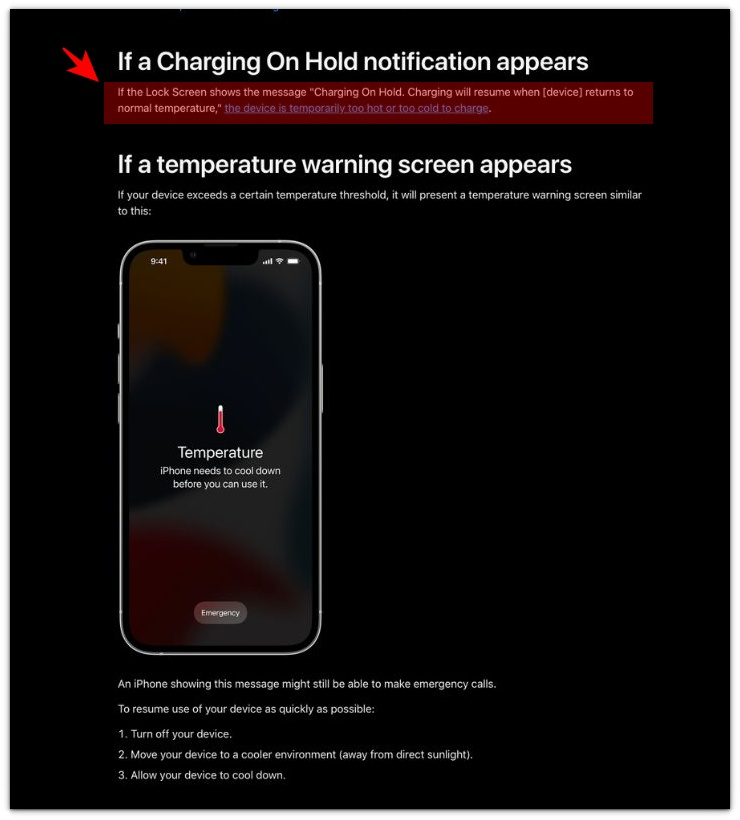
Official Source: Apple Says Charging Can Pause When iPhone Gets Too Hot
Apple shows that charging can pause when an iPhone becomes too hot or too cold.
That does not mean every warm iPhone has a serious problem, but it does make the heat pattern worth checking during charging.
Additional Tips
Do not test the iPhone while it is still in a hot room.
A cool surface will not help much if the whole room or car is already warm.
Let the phone sit in a cooler place before checking that hot spot again.
Avoid testing with a thick case, a charging stand, and a bright screen all at the same time.
Those conditions trap warmth in different ways, so they make the area harder to judge.
If the iPhone feels normal after the case comes off, do not put the same case back on for the next charge.
Use the next charge to confirm whether that area heats up without the case.
Final Notes
iPhone gets hot while charging should be judged by the pattern on the phone body.
A mild, even warmth across the back is different from one sharp hot spot near the port, camera area, center of the back, or lower edge.
Case pressure, soft surfaces, active screen use, and a warm room can all make charging heat stronger.
But the final warning sign is simple.
If one area stays hot, feels uncomfortable to hold, or returns quickly after a cooling break, stop charging in that setup.
Let it cool down first, then test the next charge with the case removed, the screen locked, and the phone on a hard, open surface.
If the same hot spot comes back again, treat it as a real charging heat problem, not normal charging warmth.
Checklist
- Feel the camera area, center of the back, and charging port area separately.
- Check whether one hot spot feels stronger than the rest of the iPhone body.
- Remove the case before judging the heat.
- Move the iPhone away from fabric, bedding, couches, warm surfaces, and direct sunlight.
- Stop video, games, maps, recording, and bright screen use during the heat check.
- Unplug the iPhone when one area stays hot or feels uncomfortable to hold.
- Treat repeated hot spots during charging as a heat problem, not normal charging warmth.
For a wider look at iPhone heat problems, use the main guide to compare charging heat with other iPhone overheating patterns.