
Introduction
────────────────────
You plug in your iPhone and expect the battery to rise normally, but the Battery screen shows a slow charging message instead.
The charger is still connected, so the warning can feel confusing at first.
iPhone slow charging message starts to matter when iOS says the connected charger is not giving enough power.
Do not judge it from the charging icon alone.
Start by checking whether the message appears again with the same charger before you blame the battery.
────────────────────
Step-by-Step Guide
────────────────────
────────────────────
Step 1: Check The Battery Screen Before You Change Anything
────────────────────
Start with the Battery screen where the warning appears.
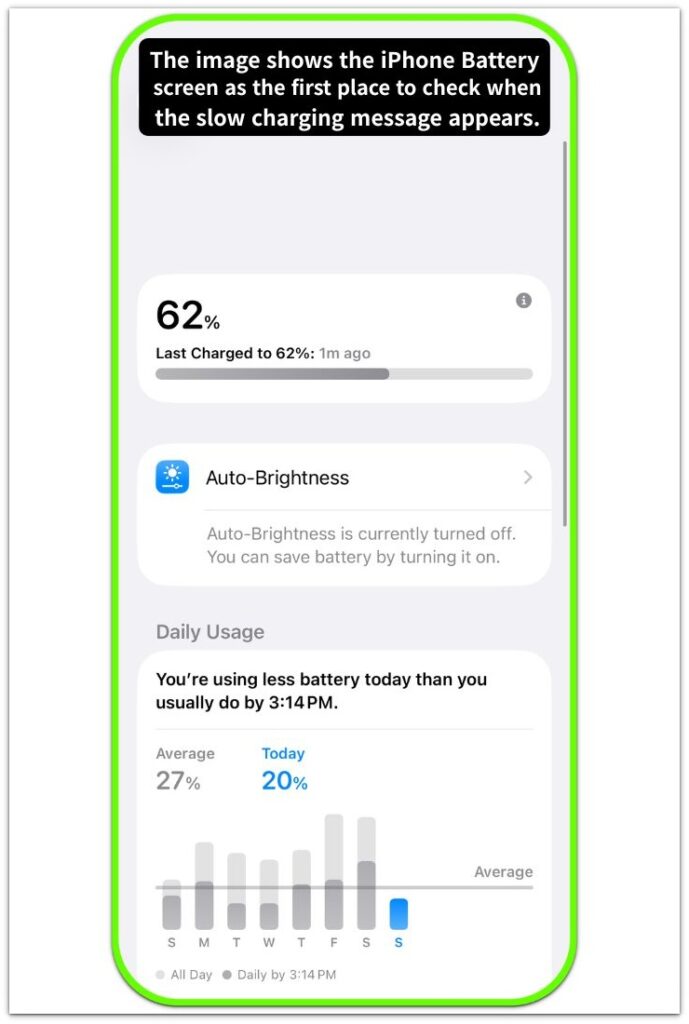
Keep the same charger connected and look at the message before you unplug anything.
Do not switch the cable, charger, outlet, and phone position at the same time.
The iPhone slow charging message is clearer when the first check stays simple.
That first look gives you a clean starting point before you test anything else.
────────────────────
Step 2: Use The Same Charger Long Enough To See The Slow Result
────────────────────
Leave the phone connected for a short stretch with the same charger.
Watch whether the battery level rises normally, barely moves, or stays behind what you expected.
The charging icon alone does not tell you enough.
The message points more clearly to the charger when the battery also rises too slowly during that same check.
A slow rise with the same charger gives you a stronger reason to look at the charger first.
────────────────────
Step 3: Try A Stronger Charger And Compare The Next Result
────────────────────
After the first check, test with a charger that you know can charge the iPhone properly.
Use the same phone and avoid changing several other things at once.
Look at the Battery screen again and see whether the slow charging message disappears.
Then compare how much the battery level rises during the next short charge.
A better result with the stronger charger points back to the original charger, not the battery.
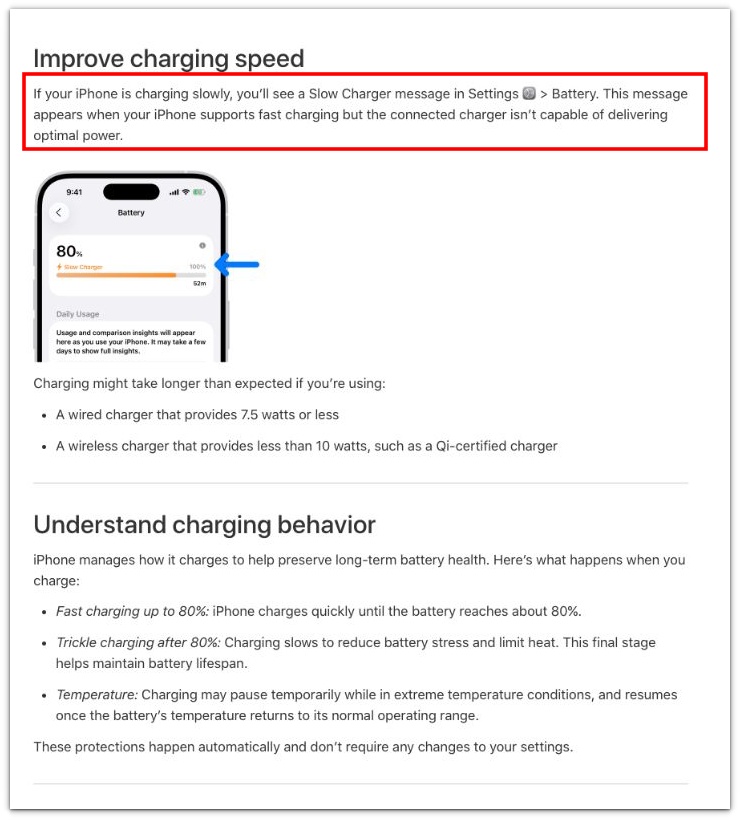
The screenshot below is from Apple’s official iPhone charging guide and shows that the Slow Charger message appears in Settings > Battery when the connected charger cannot deliver optimal power.
────────────────────
Troubleshooting
────────────────────
────────────────────
Troubleshooting 1: The Message Does Not Show Every Time
────────────────────
The warning can appear once, disappear, and still come back with the same charger later.
Do not treat one clean charge as proof that the charger is fine.
Use the same charger again and check the Battery screen after a short stretch.
The iPhone slow charging message coming back with that same charger keeps the charger under suspicion.
That repeat matters more than one clean charge without the message.
────────────────────
Troubleshooting 2: The Battery Still Rises, But Too Slowly
────────────────────
A slow charger can still raise the battery level a little.
That makes the problem easy to miss when you only look for whether charging started.
Check how much the battery level rises after the phone stays connected for a short while.
A tiny rise with the same charger points to weak charging, even when the charging icon stays on.
The charger can still be the issue even when the battery goes up a little.
────────────────────
Troubleshooting 3: A Better Charger Helps, But The Old Result Comes Back
────────────────────
A stronger charger can make the next charge look normal.
The problem is not finished if the old charger brings back the same slow result later.
Go back to the old charger only after the stronger charger has shown a better result.
Watch whether the Battery screen shows the same warning or the battery level rises too slowly again.
When the old charger keeps bringing back the same slow result, it is time to replace the charger first.
────────────────────
Additional Tips
────────────────────
Use the charger that came closest to normal charging as your comparison point.
A weak charger can make the phone look like it is charging while the battery still rises too slowly.
Do not judge the result from the first few minutes only.
Check the Battery screen again after the phone has stayed connected long enough to show a real change.
The iPhone slow charging message matters more when the same charger still leaves the battery lower than expected after a longer check.
Keep the test simple, because changing the charger, cable, outlet, and phone position together makes the result harder to trust.
────────────────────
Final Notes
────────────────────
One slow charge is not enough to blame the iPhone.
Check whether the same charger keeps leaving the battery lower than expected after another simple test.
The iPhone slow charging message carries more weight when the warning returns with that same charger and the battery still rises too slowly.
The old charger stops looking like a small doubt once the same slow rise comes back.
That makes the old charger the first part to question before you blame the battery.
────────────────────
Checklist
────────────────────
☐ Checked the Battery screen before unplugging anything.
☐ Tested the same charger long enough to see the slow result.
☐ Compared the result with a stronger charger.
☐ Checked whether the slow charging message came back with the same charger.
☐ Watched whether the battery level still rose too slowly.
☐ Checked the old charger first before blaming the battery.
If you want the wider charging check first, the guide above helps you see when slow charging points to the charger before you blame the battery.
────────────────────
Extra Section 1
────────────────────
The charging icon fooled me at first.
I saw the phone connected and thought the charger was doing its job.
The icon stayed on, so I did not think much about the charger right away.
Then I checked the battery level again and realized it had barely moved.
That was the part that made the warning harder to ignore.
The iPhone slow charging message made more sense once I stopped trusting the icon by itself.
The phone was charging, but it was not getting enough power to rise the way I expected.
After that, I checked the Battery screen and the actual battery rise together before blaming the cable or the battery.
────────────────────
Extra Section 2
────────────────────
A stronger charger made the next check look normal.
The battery rose faster, and the slow charging warning did not show the same way.
For a moment, that made the old charger feel less serious than it really was.
I thought the problem might have been one weak charge, not something worth checking again.
Then I used the old charger again later, and the battery went back to rising too slowly.
The phone still showed charging, but the battery did not rise the way it had with the stronger charger.
That difference made the old charger much harder to excuse.
After that, I stopped trusting the old charger just because it worked once in a while.