
Introduction
────────────────────
iPhone battery health after update feels more real the moment the number looks lower right after iOS finishes updating.
You open Settings, check Battery Health, and notice that the number is not where it was before the update.
The phone can still feel the same in daily use, but that lower battery health number can make battery replacement feel closer than it should.
Before deciding too quickly, give it a little time and check whether the lower number still looks the same a few days later.
────────────────────
Step-by-Step Guide
────────────────────
────────────────────
Step 1: Check Whether The Lower Number Appeared Right After The Update
────────────────────
Start with the timing.
Think back to when you last checked Battery Health before the update.
Then compare that with the first time you noticed the lower number after iOS finished installing.
Open Settings, go to Battery, then Battery Health & Charging.
Check what the current number shows now.
If iphone battery health after update looks lower the first time you checked after the update, do not jump straight to battery replacement yet.
Check how soon that lower number showed up after the update.
────────────────────
Step 2: Check Whether The Same Number Stays There For A Few Days
────────────────────
Leave the phone in your normal routine for a few days instead of checking the number again and again on the same day.
Use it the way you usually do.
Charge it the way you normally would.
Then come back later and see whether Battery Health still shows that same lower number.
A number that stays there after a few normal charging days is worth taking more seriously than one you noticed right after the update.
Give it those few days first, then check whether that lower number is still there.
────────────────────
Step 3: Check Whether Daily Battery Use Also Feels Worse
────────────────────
Look at how the phone actually behaves before you judge the Battery Health number by itself.
Pay attention to whether the battery is ending the day much earlier.
Check whether the drop feels steeper during the same routine.
Also check whether the phone needs charging sooner than before.
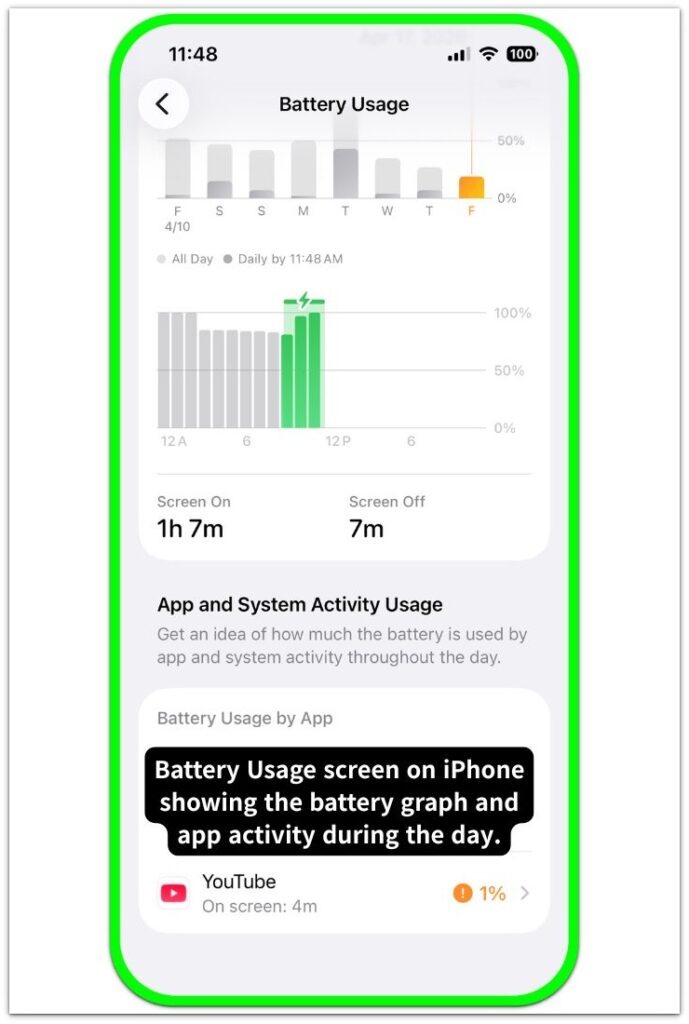
A lower number by itself does not say enough if daily use still feels close to normal.
Battery replacement becomes worth checking when that lower number stays there and the phone also feels weaker in daily use.
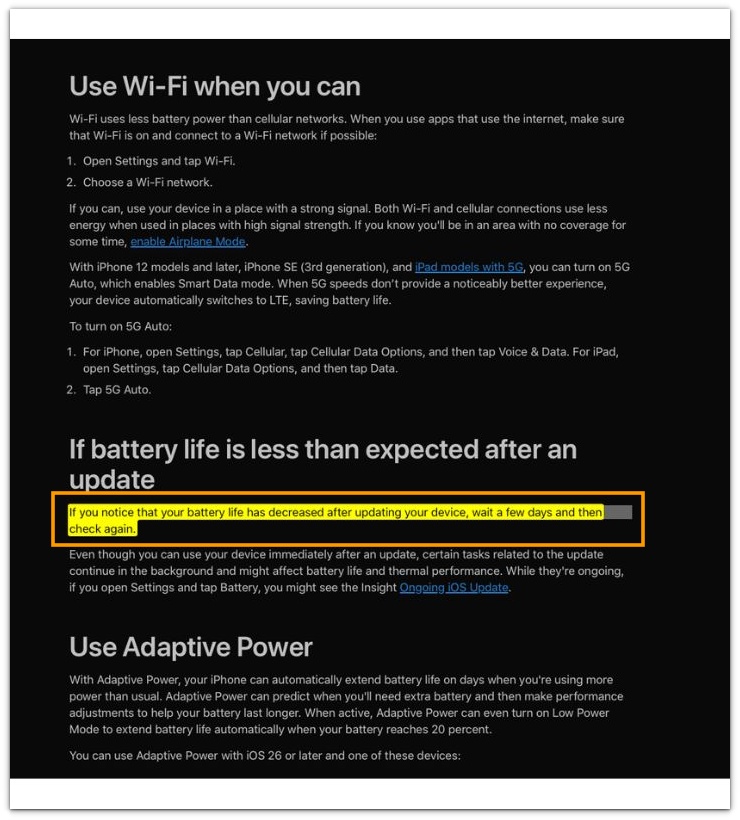
See the screenshot below where Apple explains that if battery life seems lower after an update, you should wait a few days and check again.
────────────────────
Troubleshooting
────────────────────
────────────────────
Troubleshooting 1: The Number Dropped Right Away But Daily Use Still Feels The Same
────────────────────
A lower Battery Health number can feel more serious when you see it right after the update.
That can still be hard to read when the phone lasts about the same through your usual day.
Keep using the phone the way you normally do for a few more days.
Then check whether the number still looks the same after that short stretch instead of judging it from the first check alone.
────────────────────
Troubleshooting 2: The Number Looks Stable In Use But Feels Worse After The Phone Sits
────────────────────
Daily use can feel close to normal at first.
Later, you come back to the phone and notice a bigger drop than expected after it sits for a while.
That is the kind of change worth checking more than once before tying it only to the update.
Go back to the same kind of day, leave the phone alone for a similar stretch, and see whether that weaker feel shows up again.
iPhone battery health after update becomes harder to ignore when the lower number and the weaker battery life after standby show up together again.
────────────────────
Troubleshooting 3: The Number Looked Fine Again Once, Then Dropped Back Later
────────────────────
One better check does not always settle it.
You can look again, feel relieved for a moment, then come back later and find that the lower number or weaker battery feel has returned.
Check it again after another normal day instead of treating one better moment as the final answer.
That repeated return is a sign the lower number needs more checking before you brush it off.
f that lower battery health number keeps coming back after normal use, battery replacement is the next step.
────────────────────
Additional Tips
────────────────────
Do not keep checking Battery Health several times on the same day just because the number looks lower after the update.
That can make the drop feel bigger than it is.
You are still watching too closely before the phone has gone through a few normal charging days.
Keep the phone on your usual routine, then check again after a few normal days.
iPhone battery health after update becomes easier to judge when you stop chasing the number and give it the same kind of daily use first.
────────────────────
Final Notes
────────────────────
A lower Battery Health number right after an update does not always mean the battery is ready for replacement.
Give it a little time.
Watch the same phone through the same kind of daily use.
Then check whether that lower number is still there.
iPhone battery health after update becomes more serious when the number stays lower and the phone also feels weaker in everyday use.
When both are still there together, battery replacement stops feeling like a screen-only worry.
────────────────────
Checklist
────────────────────
☐ Check when the lower Battery Health number first showed up after the update.
☐ Open Settings → Battery → Battery Health & Charging and confirm the current number.
☐ Leave the phone on your usual routine for a few days.
☐ Check whether the same lower number is still there after those days.
☐ Notice whether the battery ends the day earlier during the same kind of use.
☐ Notice whether the phone feels weaker after sitting for a while.
☐ Check again after another normal day if the number looked better once.
☐ Think about battery replacement only when the lower number stays there and the phone also feels weaker.
If the battery health number itself is what keeps bothering you, the guide above can help.
────────────────────
Extra Section 1
────────────────────
iPhone battery health after update feels more real when you open Battery Health and see that the number looks lower than it did before.
That moment can throw you off even when the phone still gets through the day about the same way.
The screen says one thing.
Your usual routine says something a little different.
The lower battery health number feels harder to read right away.
The lower number shows up before daily use feels clearly worse.
Seeing that lower number is enough to make you pause.
Right after the update, that change can feel bigger than it really is before you have had a few normal days to compare.
The more useful check comes a little later.
You use the phone the same way you usually do.
Then you look again.
By then, it becomes easier to tell whether the lower number matches real battery weakness or only that first surprise.
────────────────────
Extra Section 2
────────────────────
A few days pass, and the number is still lower when you check again.
That by itself is not always enough to call it a real problem.
The part that feels different is when the battery also starts running out earlier in the same daily routine.
You charge it the way you usually do.
You use it through the same kind of day.
By the evening, the battery is lower than you expect again.
The lower number no longer feels separate from daily use.
The lower number is still there.
Now the weaker battery life is there too.
Waiting longer does not feel the same once both start showing up together.
It starts to look like a battery you need to replace.