
Introduction
────────────────────
iPhone battery health stuck at 80 often starts bothering people when they open Battery Health again after a normal week and see the same reading still sitting there.
The phone still turns on, charges, and gets through the day, but that 80 does not move after another check.
You look at the number again because it feels like it should have changed by now.
That does not always mean the battery suddenly needs to be replaced.
First, check how the phone is behaving in daily use.
Then see whether shorter battery life, shutdowns, or slower performance are showing up along with that 80 reading.
────────────────────
Step-by-Step Guide
────────────────────
────────────────────
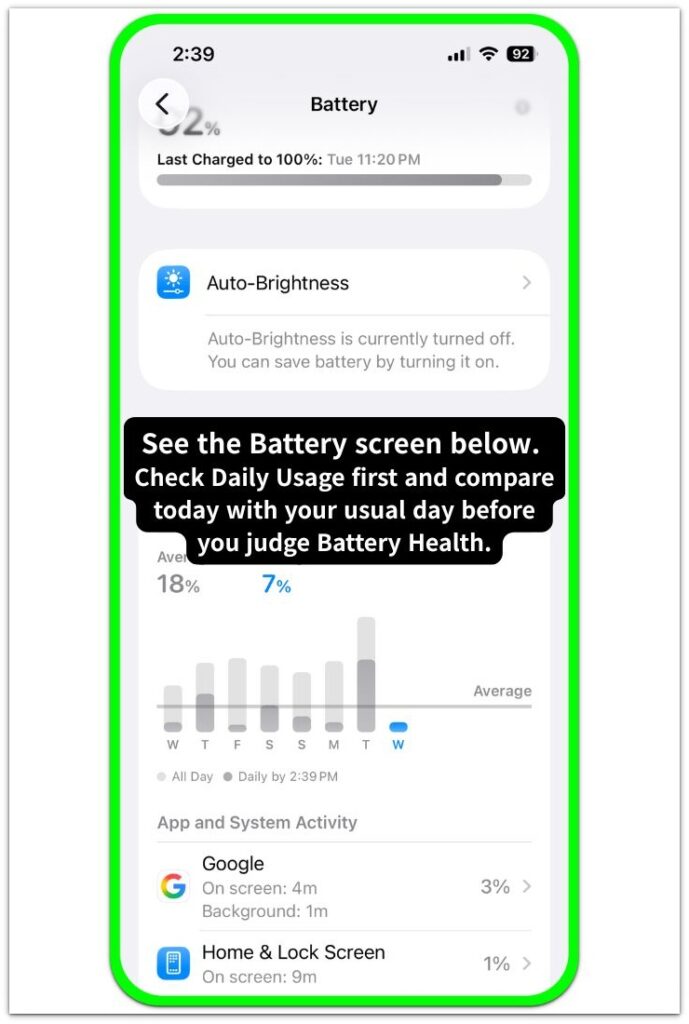
Step 1: Check Whether Daily Use Actually Feels Worse
────────────────────
Start with the way you normally use the phone.
Do not make the decision from Battery Health first.
Use the phone through an ordinary day and pay attention to what actually feels different.
Check whether the battery runs down much sooner than before, whether the phone shuts down unexpectedly, or whether it feels slower during simple tasks.
Keep that check tied to daily use, not to the reading by itself.
────────────────────
Step 2: Check Whether The Same Daily-Use Problem Keeps Coming Back
────────────────────
Go back to the kind of use where the problem first started feeling serious.
Keep the check simple.
Use the phone the way you normally would for a day or two and see whether shorter battery life or slower performance comes back under the same kind of use.
One rough day by itself is not enough.
Run the same kind of check again before treating it as a steady problem.
────────────────────
Step 3: Check Whether Replacement Is Being Judged From The Reading Alone
────────────────────
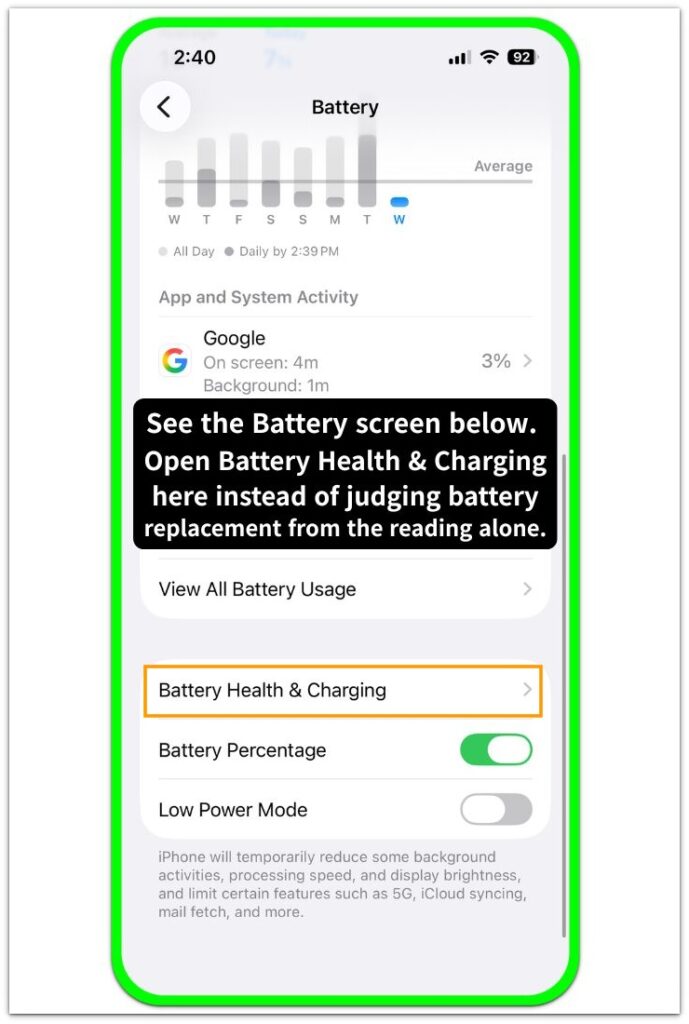
Open Battery Health again, but do not stop at the number.
Look at the phone as a whole.
Battery replacement becomes more reasonable when iphone battery health stuck at 80 comes with real daily-use problems.
When the phone is still stable, charging normally, and getting through routine use without bigger problems, the reading alone is not the best reason to replace it immediately.
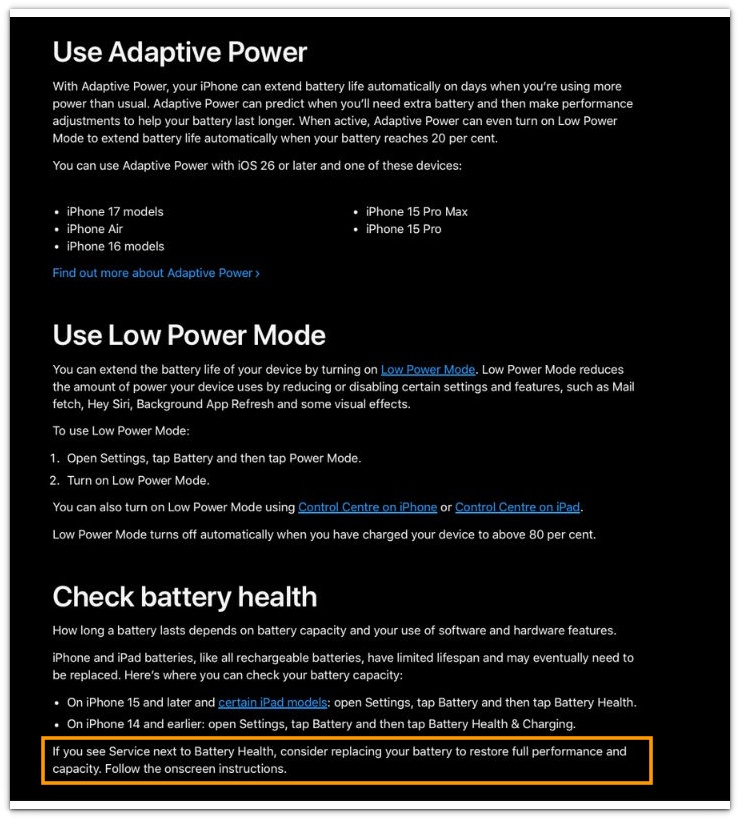
See the official Apple screenshot below for the battery health service message and replacement guidance.
────────────────────
Troubleshooting
────────────────────
────────────────────
Troubleshooting 1: The Reading Stays The Same Even When Daily Battery Life Keeps Getting Worse
────────────────────
The battery health page can stay in place while the phone starts lasting less time in the same everyday routine.
Check the phone on another normal day instead of judging it from one bad stretch.
Go back to the same kind of use and see whether the battery still runs down faster than before.
────────────────────
Troubleshooting 2: The Phone Feels Fine While You Use It, Then Drops More After You Put It Down
────────────────────
The phone can look normal while it is in your hand, then end up lower than expected after it sits for a while.
Put the phone down the way you normally would, then come back later and compare the result with what usually happens in that same part of the day.
iPhone battery health stuck at 80 deserves a closer look when the battery keeps ending lower after those same breaks.
────────────────────
Troubleshooting 3: It Looks Better For A Short Time, Then Shorter Battery Life Returns
────────────────────
One better day can make the battery problem look finished when it only eased for a short time.
Go back to the same kind of daily use that felt wrong before and watch whether shorter battery life returns.
A short improvement is not enough when shorter battery life comes back after that.
When shorter battery life keeps coming back in the same kind of normal use, it is battery replacement time.
────────────────────
Additional Tips
────────────────────
Keep the check simple.
Do not change too many things at once while you are trying to decide whether the battery is actually getting worse.
If you start checking Battery Health more often, change how you charge the phone, and watch battery life more closely all at once, it gets harder to tell what actually changed.
iPhone battery health stuck at 80 is clearer to judge when the phone stays in its usual routine and the same daily-use problem keeps showing up there.
Write down what you notice for a few days when the result still feels unclear.
A short note about battery life, charging, shutdowns, or slower performance can help you see whether the problem stays the same or gets worse.
────────────────────
Final Notes
────────────────────
Do not treat a battery health reading that stays at 80 as the full answer.
iPhone battery health stuck at 80 does not point to the same answer for every phone.
Look at what is happening in daily use.
Shorter battery life, shutdowns, or slower performance give you a much stronger reason to take replacement seriously.
When those problems are not there, the reading alone is not enough reason to rush into battery replacement.
────────────────────
Checklist
────────────────────
☐ Check how the phone behaves in normal daily use first.
☐ Watch whether battery life is clearly shorter than before in the same routine.
☐ Notice whether the phone shuts down unexpectedly during ordinary use.
☐ Check whether simple tasks feel slower than they used to.
☐ Run the same check again on another normal day.
☐ Put the phone down as usual and compare how much charge is left when you come back later.
☐ Compare the Battery Health reading with what the phone is actually doing in daily use.
☐ Keep the phone in its usual routine while you compare the results.
☐ Write down short notes about battery life, charging, shutdowns, and slower performance for a few days.
☐ Take battery replacement more seriously when the Battery Health number stays low and real daily-use problems appear together.
The internal link above can help if you want to understand what that Battery Health number is actually showing before you decide how much it matters in daily use.
────────────────────
Extra Section 1
────────────────────
I opened Battery Health more than once because that 80 stayed there every time I checked.
The phone did not feel bad enough at first to make the Battery Health number look urgent.
Calls were fine, charging still worked, and the phone could still get through light use without turning the day into a problem.
So I left it alone for a while.
Daily use changed it for me, not the reading by itself.
iPhone battery health stuck at 80 started feeling harder to ignore after the battery ended lower in the same routine and simple tasks no longer felt as smooth as before.
I stopped treating it like a Battery Health number that could wait.
────────────────────
Extra Section 2
────────────────────
I noticed it more when I was out than when I was home.
At home, the phone could still feel manageable because I was never too far from a charger and could put it down whenever I wanted.
The difference showed up on short errands, quick appointments, and ordinary time away from home when I expected the battery to feel steady enough not to think about it.
It stopped feeling easy to dismiss during simple time out of the house.
One screen in Settings was not what pushed it there.
The change came when the phone stopped feeling dependable during simple time out of the house.
I stopped asking whether the Battery Health number looked low.
I started asking whether I still trusted the phone to get through a normal day.