
Introduction
────────────────────────
iPhone activation lock without apple id refers to a state where activation stops because Apple’s server cannot verify ownership.
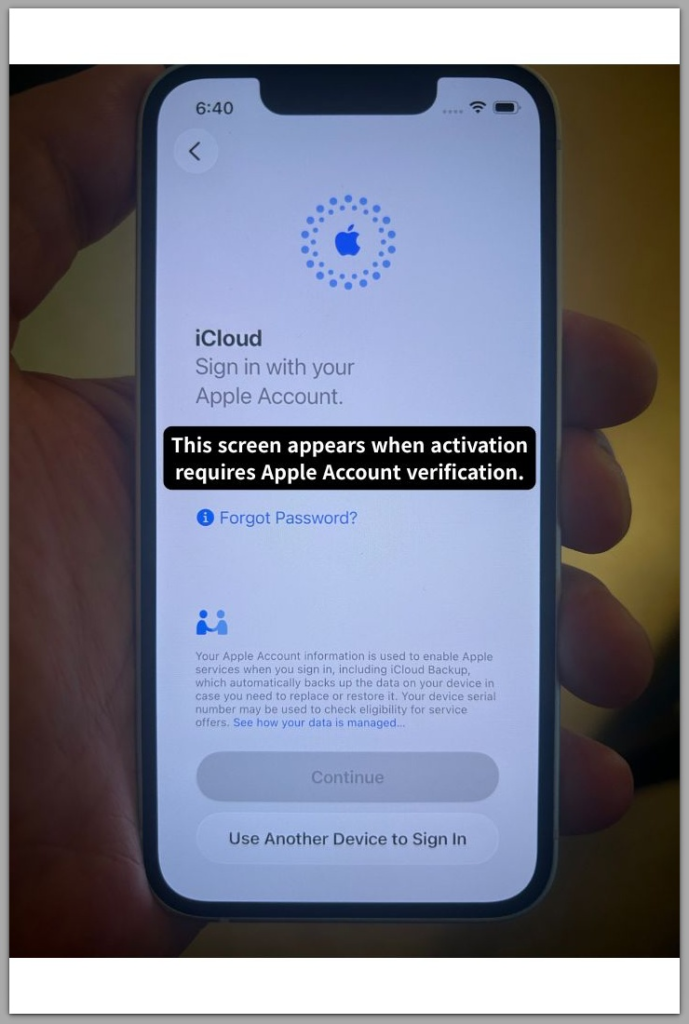
The setup screen requests the Apple ID previously linked to the device.
No alternative path appears.
Entering different credentials does not change the result.
This is not a delay.
It is not a setup mistake.
The device enforces a stored ownership record.
Verification does not occur inside the phone.
Instead, the device contacts Apple’s activation server and waits for confirmation.
Until Apple validates ownership, the Home Screen remains inaccessible.
When Apple ID credentials are unavailable, user control does not extend beyond server verification.
Local actions no longer influence the outcome.
────────────────────────
H3 Step-by-Step Guide
────────────────────────
────────────────────────
Step 1: Confirm Activation Lock Is Active
────────────────────────
Power on the device after a reset.
If the setup screen requests the previous Apple ID and password, Activation Lock is active.
Reaching the Home Screen rules Activation Lock out.
Opening Settings without restriction confirms activation already succeeded.
Correct identification prevents confusion between account login problems and server-level ownership enforcement.
────────────────────────
Step 2: Identify Where Verification Happens
────────────────────────
In iphone activation lock without apple id situations, ownership validation does not occur locally.
During setup, the device contacts Apple’s activation servers.
Apple checks the serial number against its ownership database.
If the ownership link remains active, activation stops immediately.
Reinstalling iOS does not remove this linkage.
In contrast, the system reinstalls firmware while preserving the ownership record.
Resetting the device also does not alter it.
Control does not extend beyond Apple’s activation verification system.
────────────────────────
Step 3: Evaluate Apple ID Access Status
────────────────────────
Access to the original Apple ID resolves the lock when credentials are correct.
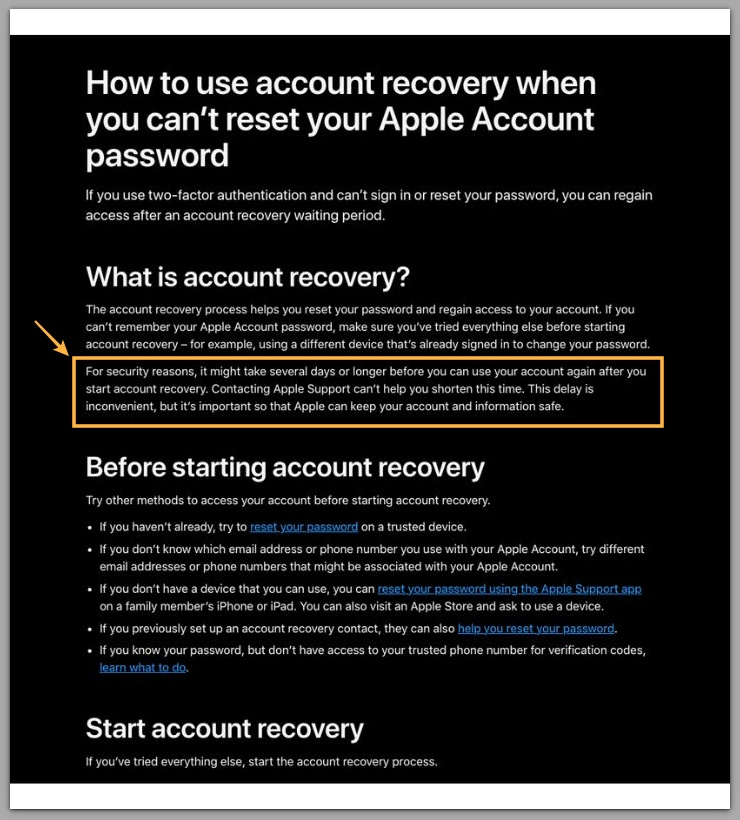
Trusted devices or recovery channels must complete two-factor authentication.
If the Apple ID email and password are permanently lost, activation cannot proceed.
In iphone activation lock without apple id cases, the device functions normally.
The system enforces stored ownership data.
For detailed information about account recovery timelines and requirements, refer to Apple’s official guide below.
────────────────────────
Troubleshooting: iphone activation lock without apple id
────────────────────────
────────────────────────
Mistaking Activation Lock for a Login Error
────────────────────────
Many users encountering iphone activation lock without apple id assume the screen requests their current Apple ID.
Activation Lock requires the Apple ID previously associated with the device.
Using a different Apple ID never succeeds.
The system checks ownership history, not present user preference.
If the displayed Apple ID does not belong to the current holder, the issue concerns ownership continuity rather than password accuracy.
────────────────────────
Why Restore Attempts Do Not Change the Result
────────────────────────
A factory reset does not remove Activation Lock.
Restoring iOS reinstalls system software while Apple preserves the ownership record on its servers.
Even in DFU mode, the device reconnects to Apple during setup.
Verification runs again automatically.
As long as the ownership record remains active, the activation screen appears again.
Repeated restore attempts produce the same result.
────────────────────────
When Apple Support Becomes the Only Path
────────────────────────
When Apple ID access is unavailable and the previous owner cannot be reached, official review remains the only path.
In this situation, Apple Support evaluates proof of purchase linked to the device’s serial number.
A retail receipt that matches Apple’s database may allow ownership transfer.
However, documentation that cannot be verified keeps activation blocked.
This process operates at an administrative level.
Apple clears the server record; the device does not unlock itself.
If additional assistance is required, the next step extends beyond standard device procedures.
────────────────────────
Additional Tips
────────────────────────
Before purchasing a second-hand device, confirm that iphone activation lock without apple id does not appear during setup.
Activation status can be checked during initial configuration.
For this reason, ask the seller to remove the device from their Apple ID in person.
Screenshots and verbal assurances do not confirm server-level removal.
A reset device that still requests an Apple ID was never removed from the activation database.
Physical possession alone does not grant activation authority.
────────────────────────
Final Notes
────────────────────────
iPhone activation lock without apple id represents a server-enforced ownership boundary.
The device cannot override activation authority stored in Apple’s database.
Without valid Apple ID credentials, activation cannot proceed.
Firmware restoration and technical procedures do not change server-side ownership records.
The limitation exists at the administrative level.
Verified proof of purchase may allow Apple to clear the ownership record.
Otherwise, unverified documentation results in continued restriction.
This boundary marks the line where personal control stops and server authority takes over.
────────────────────────
Checklist
────────────────────────
☐ Confirm the Activation Lock screen is present
☐ Verify access to the original Apple ID
☐ Contact the previous owner if purchased used
☐ Prepare official proof of purchase before contacting Apple Support
☐ Understand that restore attempts do not remove server-level ownership
This situation does not mean the device is broken; it means Apple’s system still enforces ownership.
────────────────────────
Extra Section 1
────────────────────────
Activation Lock enforcement operates at the infrastructure level.
When users enable Find My, Apple registers the device identifier in its activation database.
That registration survives resets, storage replacement, and firmware installation.
Ownership data does not reside in visible device settings.
Apple maintains the authoritative record within its server environment.
Holding the hardware does not automatically grant operational authority.
Many users encounter this boundary only when activation suddenly stops.
Security architecture prioritizes ownership protection over convenience.
The device reflects the ownership decision stored in Apple’s activation system.
────────────────────────
Extra Section 2
────────────────────────
Second-hand purchases frequently expose iphone activation lock without apple id boundaries.
A buyer may receive an iPhone that appears fully reset.
During setup, Activation Lock requests an unfamiliar Apple ID.
The seller may insist the device was cleared.
Even so, a restore through a computer completes successfully.
After reboot, the same activation screen appears again.
In many cases, payment has already been made.
The buyer then realizes possession does not equal activation authority.
Without cooperation from the original Apple ID holder or verified proof of purchase, access remains blocked.
Another scenario involves long-term ownership.
A family member forgets the Apple ID created years earlier.
The associated email account no longer remains accessible.
Following a reset, activation stops at the verification screen.
The device itself remains intact.
Yet Apple’s server-stored ownership data prevents further progress.
Understanding this boundary before resetting or purchasing a device prevents irreversible loss.
Ownership verification must complete before access is granted.