
Introduction
────────────────────────
iphone restore lost data recovery limits describes a situation where an iPhone completes a restore without errors, yet certain app data is already gone before the process finishes.
From the outside, the restore appears successful.
The phone boots normally.
Apps reinstall and open as expected.
The issue surfaces later, inside the apps themselves.
Saved progress does not appear.
Local history remains empty.
Some apps behave as if they were newly installed.
This is not a partial restore failure.
The limitation forms earlier, during the backup stage.
Once that limit exists, the restore process cannot cross it.
────────────────────────
Step-by-Step Guide : iphone restore lost data recovery limits
────────────────────────
────────────────────────
Step 1: confirm what exactly did not return
────────────────────────
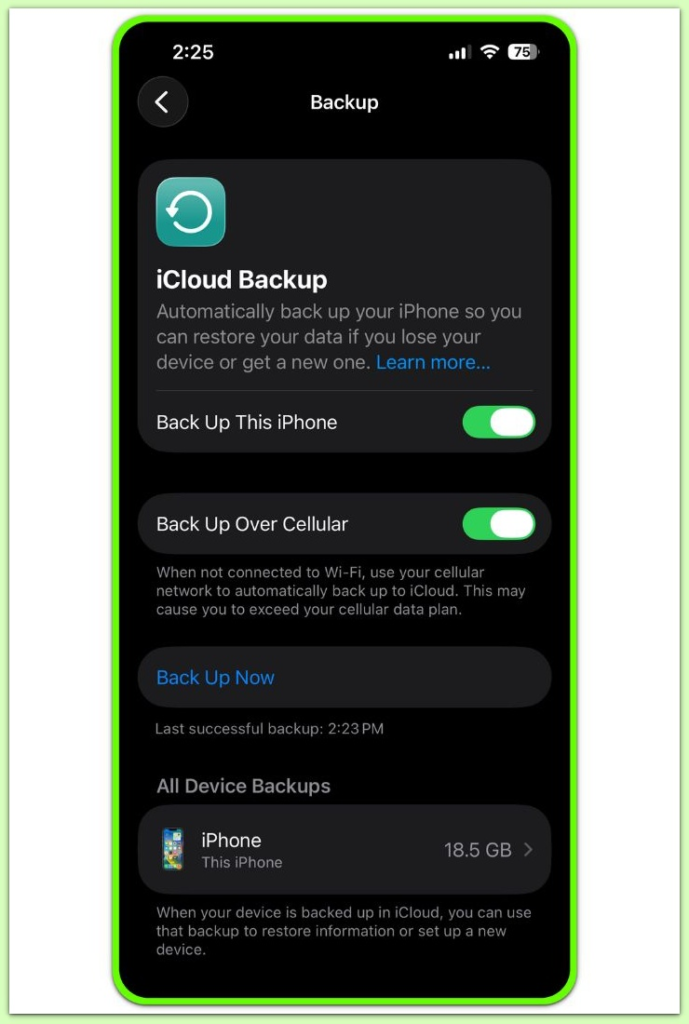
Start with the app, not the backup.
If the app launches cleanly but shows no previous data, the restore completed correctly.
What failed was not the restore process, but the expectation.
At this point, one question matters.
Was this data ever included in the backup?
If the answer is no, the iphone restore lost data recovery limits already apply.
────────────────────────
Step 2: understand why some app data is never backed up
────────────────────────
Apps handle data differently.
In many cases, the data never leaves the app environment.
Some developers store it locally only.
Others place it on their own servers and exclude it from iPhone backups entirely.
Security also plays a role.
Authentication tokens, encrypted containers, and session data often remain outside the backup by design.
When this happens, the backup finishes without warnings.
The exclusion stays silent but permanent.
────────────────────────
Step 3: why changing between icloud and computer backups does not help
────────────────────────
Many users assume a different backup source leads to a different result.
In practice, the result stays the same.
iCloud and computer backups follow identical inclusion rules.
Only the storage location changes.
If the data was excluded once, the iphone restore lost data recovery limits recreate the same outcome on every restore.
The system applies the same boundary each time.
This reflects a structural limit, not a temporary error.
────────────────────────
Step 4: stop repeating restore attempts that cannot change the result
────────────────────────
Repeated restores feel active, but they add no new information.
Each restore completes normally, yet nothing new appears.
The outcome stays consistent across attempts.
That pattern itself becomes the answer.
It confirms the boundary is fixed.
Further attempts do not improve recovery chances.
They only delay the conclusion.
At this stage, user-level actions stop affecting the result.
If you want a deeper understanding of how restore boundaries are defined and why certain data cannot be recovered once excluded, this reference explains how restore behavior is determined at a system level.
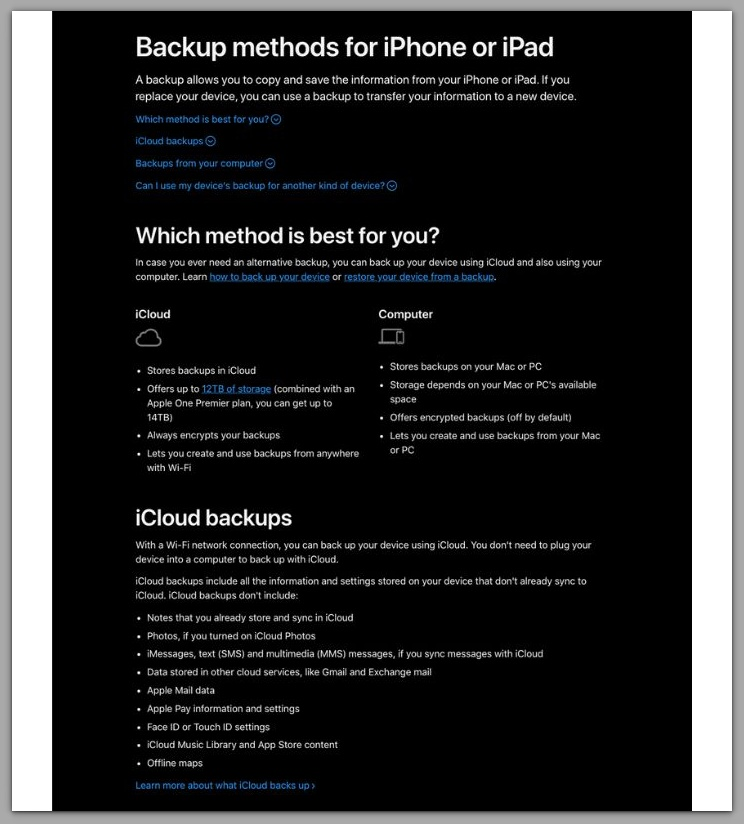
How iPhone backups define what data is included and excluded
────────────────────────
Troubleshooting
────────────────────────
────────────────────────
data missing vs account reset: identify the boundary first
────────────────────────
Two outcomes look similar but mean different things.
If data appears after signing in, the restore never handled it.
The app simply re-synced content from its servers.
If signing in changes nothing, the backup never contained the data.
Restore attempts no longer help at that point.
────────────────────────
same result across multiple restores is not coincidence
────────────────────────
When iCloud and computer restores produce the same loss, the cause is fixed.
The backup contents stay identical.
Only the storage location differs.
Repeating the process cannot unlock new data under iphone restore lost data recovery limits.
────────────────────────
reinstalling the app does not recreate excluded data
────────────────────────
Reinstallation can repair a broken app.
It cannot rebuild missing history.
If the backup excluded the data, reinstalling only resets the app shell.
In some cases, it removes the last remaining local traces.
This step often feels productive but moves recovery backward.
────────────────────────
security and encryption blocks that do not raise warnings
────────────────────────
Some app data never enters backups.
Encrypted containers, secure tokens, and protected storage stay excluded.
The backup still completes without errors.
The loss becomes visible only after restore.
By then, the recovery limit already applies.
────────────────────────
Additional Tips
────────────────────────
App data loss after restore rarely happens at random.
Under iphone restore lost data recovery limits, the data location before backup determines the outcome.
The restore method does not.
If content appears only after signing in, the source was external.
If content never returns, the backup never captured it.
This distinction matters more than repeating restores.
Once identified, the result becomes predictable.
────────────────────────
Final Notes
────────────────────────
A restore finishing without errors does not guarantee full app data recovery.
If the backup excluded the data, iphone restore lost data recovery limits prevent the restore from recreating it.
When the same result repeats, the recovery boundary is confirmed.
────────────────────────
Checklist
────────────────────────
☐ Confirm whether signing in restores the missing content
☐ Check if the app uses its own cloud or server-based sync
☐ Verify whether the data ever appeared in the backup snapshot
☐ Stop repeating restores once the same result appears
☐ Review backup behavior before the next restore attempt
────────────────────────
Extra Section 1
────────────────────────
The most common misunderstanding appears after the restore finishes.
Users see missing app data and assume the restore failed midway.
In reality, the restore often worked as designed.
The critical moment occurred earlier.
It happened when the backup snapshot was created.
If the snapshot excluded the app data, iphone restore lost data recovery limits cause every restore to inherit the same absence.
No restore method can add data that never entered the backup.
This explains why timing matters.
A backup created days or weeks earlier may already reflect reduced data.
Changes made after that point never existed inside the snapshot.
Once this timing becomes clear, confusion fades.
The focus shifts to what the backup actually contained.
────────────────────────
Extra Section 2
────────────────────────
Recovery decisions grow harder once effort accumulates.
After one restore fails, many users feel pressure to keep trying.
They change setups, devices, or methods, expecting a different result.
The environment changes, but the outcome does not.
That mismatch points back to the backup contents.
iOS provides no secondary recovery layer for excluded app data.
No hidden restore pass activates later.
If the data still exists, it lives outside the backup system.
Usually on the app provider’s servers.
Sometimes on an old device that remains untouched.
If neither exists, the loss is final.
Recognizing this boundary early prevents unnecessary repetition.
It also avoids accidental overwrites that destroy the last remaining copy elsewhere.
At that point, the productive move is not another restore.
It is stopping, reassessing, and preparing better backups for the future.